YouTube Music Promotion for Independent Artists: 2026 Playbook
The fastest, highest-impact YouTube music promotion plan right now is this: use Shorts for discovery, long-form videos for retention and monetization, and pick one conversion metric to track whether discovery is actually turning into fans. YouTube is the primary music discovery platform for 46% of music listeners worldwide, according to IFPI’s 2025 Global Music Report. That number alone justifies making it your main promotional channel, not a secondary one.
Here’s what to do this week:
- Publish 3 Shorts from your most recent session footage, each under 60 seconds with a strong hook in the first 3 seconds.
- Schedule a premiere for your lead video at least 48 hours out so fans can set a reminder.
- Add a smart link to the first line of every video description and pin it as a comment.
- Update your channel metadata: About copy, streaming links, and contact info.
- Run one small ad test at $5–$10/day on a skippable in-stream format for 7 days.
The funnel works like this: Shorts pull in cold audiences at scale, long-form music videos convert those viewers into subscribers and watch-time, and your smart link or follow CTA routes them into something you own (email list, streaming saves, DMs). That chain is how discovery becomes revenue.
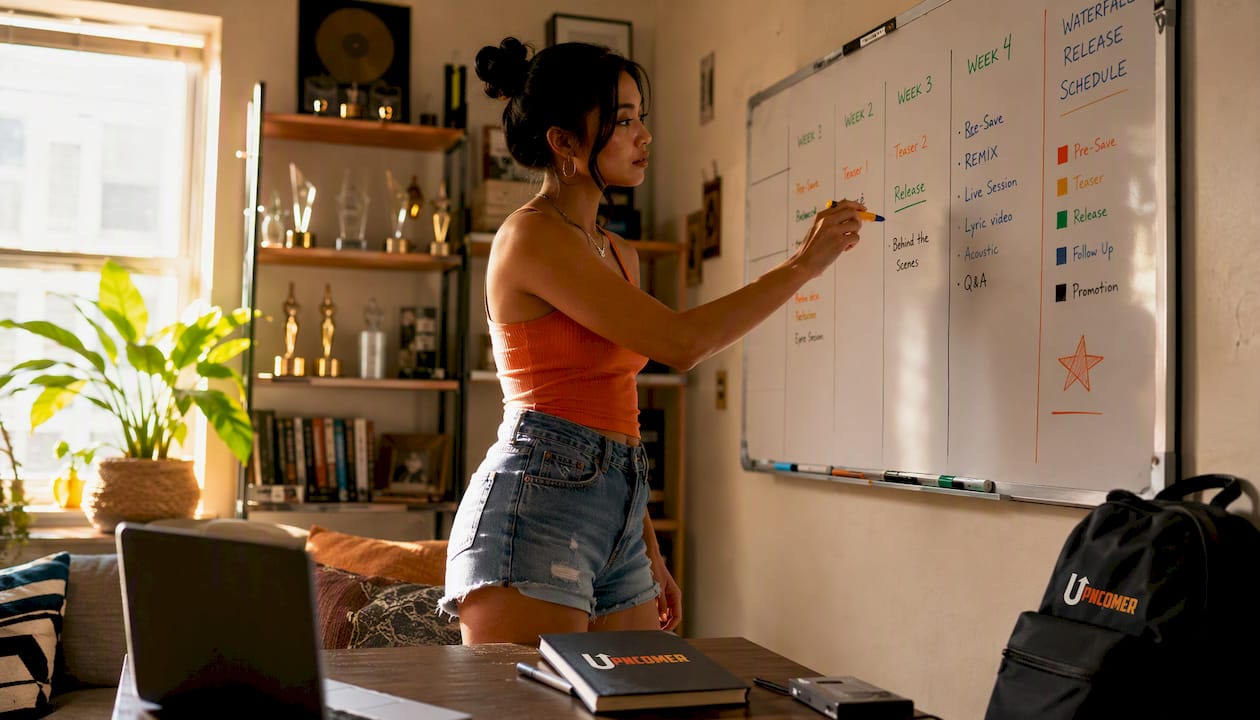
Pro Tip: Instead of dropping everything on release day, use a waterfall sequence: tease clip → Short → lyric video or visualizer → official music video. Each piece signals fresh activity to the algorithm and gives fans a reason to come back.
Table of Contents
- 1. How to set up your YouTube channel so visitors instantly know who you are
- 2. How to package videos so people actually click
- 3. Tactics to win the first 15 seconds and keep viewers watching
- 4. Which content formats to use and when to use each
- 5. A simple weekly publishing system that keeps your channel active
- 6. How to find, evaluate, and pitch YouTube music promotion channels
- 7. Which metrics to track and how to build a simple dashboard
- 8. When to use paid YouTube promotion and what to expect
- 9. Practical tactics to convert YouTube viewers into streaming listeners
- 10. Realistic timelines and typical costs for promoting music on YouTube
- 11. A concrete 30/90-day checklist to run your first YouTube campaign
- 12. Data-driven campaign workflow: the evidence behind the strategy
- Key Takeaways
- What I would actually do this week as an independent artist
- Upncomer gives independent artists a full promotional toolkit in one place
- Useful sources and further reading
- FAQ
1. How to set up your YouTube channel so visitors instantly know who you are
Your channel is your storefront. A new visitor decides in about five seconds whether to subscribe or bounce, so every element needs to do a job.
Profile essentials:
- Use your artist name exactly as it appears on streaming platforms. Consistency across Spotify, Apple Music, and YouTube matters for algorithmic matching.
- Write an About section that answers three questions in the first two sentences: who you are, what genre/sound you make, and where to find your music. Put your smart link and streaming URLs in the links section, not buried in the description.
- Apply for an Official Artist Channel through your distributor. It consolidates your Art Tracks with your uploaded videos and unlocks the verified checkmark.
Channel layout checklist:
| Element | What to do |
|---|---|
| Profile image | High-res artist photo or logo, minimum 800×800px, readable at small sizes |
| Banner | 2560×1440px; include one clear CTA (“New single out now — link below”) |
| Featured video | Set a channel trailer for non-subscribers; set your best-performing video for returning visitors |
| Playlists | Create genre or mood playlists, not just release-order dumps; pin the most relevant one |
| Links section | Smart link first, then Spotify, Apple Music, Instagram, and email signup |
| Pinned comment | Template: “Stream [Song Title] here [smart link] — follow for new music every [day]” |
Metrics to evaluate channel health: watch subscriber growth rate week over week, average views per video (not total channel views), and audience retention percentage. A solid retention rate on long-form videos is an important baseline metric for emerging artists.
Pro Tip: Set a channel trailer that is under 60 seconds, starts with your best hook, and ends with a direct “subscribe” ask. Most artists skip the trailer entirely and lose their best chance to convert a cold visitor.
2. How to package videos so people actually click
Click-through rate (CTR) is the first signal YouTube uses to decide whether to push your video to more people. Titles and thumbnails are the two levers you control before anyone presses play.
Title formula: Keep it under 60 characters. Lead with the song title and artist name, then add a hook or context word if you have room. “Neon Rain (Official Video) — Maya Cross” works. “My new song that I made in my bedroom about heartbreak” does not. For Shorts, front-load the emotional hook: “This beat hits different at 2AM” outperforms “New Short #47.”
Thumbnail checklist:
- Legible text at mobile size (test by shrinking to 120px wide)
- Face or subject in close-up, not a wide landscape shot
- High contrast between subject and background
- Consistent color palette that makes your channel recognizable at a glance
- One focal point only; cluttered thumbnails lose to simple ones every time
Description best practices: The first 150 characters appear in search results before the “show more” cutoff. Put your smart link and song title there. Below that, add timestamps for multi-segment videos, full lyrics (for lyric videos), and a tag block with 5–8 relevant keywords. Avoid stuffing 30 tags; YouTube’s own guidance suggests focused, accurate tags outperform keyword spam.
A/B testing thumbnails: YouTube Studio’s “Test and Compare” feature lets you run two thumbnail variants on the same video. Check CTR after 48–72 hours. A difference of even 1–2 percentage points compounds significantly across thousands of impressions.
Pro Tip: Design your thumbnail before you shoot the video, not after. Knowing the thumbnail concept in advance means you capture the right shot on set instead of cropping a mediocre frame.
3. Tactics to win the first 15 seconds and keep viewers watching
Retention is the metric that feeds YouTube’s recommendation engine. If viewers drop off in the first 15 seconds, the algorithm stops pushing your video. If they stay, it pushes harder.

Front-load the payoff. Show the most visually engaging moment of the song, cut to the chorus, or open with a direct statement that creates curiosity. Do not open with a 10-second logo animation or a slow fade-in. Those are retention killers.
For Shorts, the first frame is everything. YouTube reported over 90 billion daily Shorts views, and the Shorts algorithm prioritizes completion rate over raw watch time. A Short that 80% of viewers watch to the end will outperform one with twice the views but a 30% completion rate. Keep Shorts between 30–50 seconds for the best completion signals.
For long-form music videos, structure matters. Use visual changes at predictable timestamps (verse, pre-chorus, chorus, bridge) so the retention graph stays flat rather than cliff-dropping. Jump cuts, motion graphics, and lyric overlays in the first 30 seconds all reduce early drop-off. If you have a breakdown or a key change, tease it in the first 10 seconds.
Pro Tip: Pull up your YouTube Studio retention graph on your last three videos. Find the exact timestamp where viewers drop. That is your editing problem to fix on the next upload, not a mystery.
4. Which content formats to use and when to use each
Different formats do different jobs. Trying to make one video do all of them at once is how you end up with content that does none of them well.
| Format | Primary job | When to prioritize |
|---|---|---|
| Shorts | Discovery, new audience reach | Every week; especially around release windows |
| Official music video | Storytelling, long-term monetization | Lead single, album cycle |
| Lyric video / visualizer | Repeatable watch time, catalog monetization | B-sides, deep cuts, older catalog |
| Live / performance video | Fan engagement, authenticity | Post-tour, acoustic sessions, fan milestones |
| Behind-the-scenes | Community building, parasocial connection | Between releases to maintain momentum |
YouTube for Artists recommends posting Shorts alongside long-form on release day as part of a multi-format release strategy. The idea is that each format reaches a slightly different audience segment and signals consistent activity to the algorithm.
Batching tips by format:
- Shorts: Film 5–8 clips in one session. Vary the angle and hook, but use the same backing track. Edit in CapCut or directly in the YouTube Shorts editor.
- Lyric videos: Use UrStudio or a template-based tool to produce a clean visualizer in under two hours. These are your catalog workhorses.
- Behind-the-scenes: Leave your phone recording during a studio session. You will have 20–30 minutes of raw footage that edits into 3–5 Shorts and one longer “making of” cut.
Recommended cadence during a release window: Shorts 3x per week, one lyric video or visualizer, one official video, and one community post. Outside a release window, drop to 1–2 Shorts per week and one longer-form piece every two weeks.
5. A simple weekly publishing system that keeps your channel active
Consistency beats intensity. Posting 30 videos in one week and then going silent for two months signals instability to the algorithm and to your audience.
| Day | Task |
|---|---|
| Monday | Content production: film 3–5 Shorts, record any B-roll or behind-the-scenes |
| Tuesday | Edit and export Shorts; write descriptions and metadata using a saved template |
| Wednesday | Publish first Short; post a Community Tab update about the week’s content |
| Thursday | Respond to comments on all recent videos; check YouTube Studio analytics |
| Friday | Publish second Short; cross-post to Instagram Reels and TikTok |
| Saturday | Batch-edit long-form content or lyric video for the following week |
| Sunday | Schedule the week’s remaining content; update your content calendar |
For file naming, use a consistent convention: [ArtistName]_[SongTitle]_[Format]_[Version]_[Date]. It sounds tedious until you are searching for the right export at midnight before a release.
YouTube for Artists emphasizes that community features and consistent, varied content drive higher sustained growth than sporadic uploads. The Community Tab is underused by most independent artists. A simple “new Short drops tomorrow” post takes 30 seconds and primes your audience to watch.
Upncomer’s Content Creator and Artist Manager modules can automate scheduling and metadata templating, cutting the Tuesday editing-and-publishing workflow from 90 minutes to closer to 30.
Pro Tip: Batch your entire month of Shorts in one four-hour session. Pick one day per month, film everything, and schedule it all. You will never miss a posting day because you were “too busy.”
6. How to find, evaluate, and pitch YouTube music promotion channels
Third-party YouTube channels that feature independent artists can put your music in front of thousands of listeners who have never heard of you. But not all of them are worth your time or money.
Finding channels in your genre:
- Search YouTube for “[your genre] music playlist” or “[your genre] new artists 2026.”
- Check the “Channels” tab on videos from artists similar to you.
- Use YouTube search operators:
site:youtube.com "[genre] music channel"in Google to surface channels that may not rank in YouTube search itself.
Channel evaluation checklist:
- Average views per video (not subscriber count; a channel with 50K subscribers averaging 200 views per video is a red flag)
- Subscriber-to-view ratio: healthy channels typically see 5–15% of subscribers watching each video
- Audience geography: ask for a screenshot of their YouTube Studio demographics; if 80% of their audience is outside your target market, the placement may not convert
- Engagement rate: comments and likes relative to views; bot-inflated channels have high views and near-zero comments
- Retention signals: do their videos have consistent watch time, or do they spike on upload day and flatline?
Industry guidance recommends demanding verifiable analytics and platform-level proof when paying for promotion services. Any channel that cannot show you YouTube Studio screenshots is not worth paying.
What to include in your pitch package:
- A smart link to the track (not a raw file attachment)
- A one-sentence description of the song and its mood or genre
- Any stems or acapella files if the channel does remixes or reaction content
- Your channel stats (views, subscribers, recent growth)
- A note on exclusivity if you are offering a premiere
Email pitch template:
Subject: [Song Title] by [Artist Name] — [Genre] submission
Hi [Channel Name],
I’m [Artist Name], an independent [genre] artist based in [City]. I think “[Song Title]” would fit well with your audience — it’s [one-sentence description].
Smart link: [URL] YouTube channel: [URL]
Happy to send stems or an exclusive clip if that helps. Let me know either way.
[Your name]
Follow up once, seven days after the initial email. If there is no response after two attempts, move on.
Pro Tip: Pitch 10–15 channels per release, not 2–3. Most will not respond. A placement rate of about one-fifth to one-third is realistic and considered good. Volume is the strategy.
7. Which metrics to track and how to build a simple dashboard
Most artists track the wrong thing. Views feel good but they do not tell you whether anyone cared enough to do something. The real success metric is routing attention into measurable intent actions like smart-link clicks, email signups, and playlist adds.
| Metric type | Examples | What it tells you |
|---|---|---|
| Attention | Views, impressions, Shorts plays | Reach; how many people saw the content |
| Engagement | Watch time, retention %, likes, comments | Whether the content held interest |
| Intent | Smart-link clicks, playlist adds, follows | Whether viewers wanted more |
| Conversion | Email signups, merch clicks, stream saves | Whether discovery became a fan action |
Picking your North Star metric: If your goal is discovery, track CTR and views. If your goal is fan conversion, track smart-link clicks or follows. Pick one and make every decision against it for at least 30 days before switching.
Dashboard setup in YouTube Studio:
- Check the “Reach” tab weekly for CTR and impressions.
- Check the “Engagement” tab for average view duration and retention graphs.
- Add UTM parameters to every smart link (e.g.,
?utm_source=youtube&utm_medium=description) so you can see in your smart-link analytics exactly which video drove the click.
For a deeper view, music production analytics tools can pull cross-platform data into one place so you are not toggling between five dashboards.
Review cadence: Quick check every Thursday (5 minutes, just CTR and views on the week’s content). Monthly deep dive on the last Sunday of the month (retention graphs, conversion funnel, ad performance if running paid).
Pro Tip: Set a YouTube Studio alert for any video that hits 500 views in 48 hours. That is your signal to boost it with a small ad spend while the momentum is real.
8. When to use paid YouTube promotion and what to expect
Paid promotion amplifies what is already working. It does not fix a weak video, a bad hook, or a channel with no conversion path. Run organic first, then pay to scale what converts.
When to start: Only run paid ads after you have an optimized landing video (strong hook, clear CTA, smart link in description) and at least one organic video with above-average retention. Spending money to send traffic to a video with a 20% retention rate is burning budget.
Ad formats that work for music:
- Skippable in-stream ads: Play before or during other videos; viewers can skip after 5 seconds. Your hook must land in those 5 seconds. Budget $5–$15/day for 7–14 days as a test.
- Shorts feed ads: Appear in the Shorts feed between organic Shorts. Lower CPM, high volume, good for discovery. Use a 30–45 second cut with a strong visual hook.
- In-feed / discovery ads: Appear in YouTube search results and the homepage. Better for driving intentional views on a specific video.
Targeting basics: Seed your campaign with similar-artist audiences and geography filters. If your music is indie folk, target fans of artists in that space. Add a geography filter to prioritize high-RPM markets (US, UK, Canada, Australia) if monetization is a goal, since RPM varies significantly by country and Shorts completion-driven discovery can produce meaningfully different revenue depending on where your audience is.
Measurement: Track cost-per-smart-link-click or cost-per-follow, not cost-per-view. Views are cheap and often meaningless. A campaign that costs $0.50 per smart-link click is performing well.
Pro Tip: Create two or three hook variants of the same ad (different first 5 seconds, same song) and run them simultaneously at $3/day each. After 72 hours, kill the underperformers and put the full budget behind the winner.
9. Practical tactics to convert YouTube viewers into streaming listeners
Getting views is only half the job. The other half is making sure those viewers end up on your Spotify, Apple Music, or email list. YouTube pays artists on two fronts: streaming royalties via YouTube Music and ad revenue via the YouTube Partner Program. But your owned channels (email, DMs) are where long-term fan relationships live.
Smart link placement checklist:
- First two lines of every video description (before the “show more” cutoff)
- Pinned comment on every video, updated within the first hour of publishing
- End screen button linking to your smart link landing page
- Community Tab post on release day
- Channel banner link (one of your five allowed external links)
Premiere checklist: Schedule premieres at least 48 hours in advance. Use the premiere waiting room to post a pinned comment with your smart link before the video even starts. When viewers arrive early, they see the link immediately. After the premiere, send a Community Tab post to everyone who watched.
CTA templates that drive clicks:
- Description: “Stream [Song Title] on all platforms [smart link] | Follow for new music every [day]”
- Pinned comment: “If you made it this far, you’re a real one Stream it here: [smart link]”
- End screen verbal CTA: “Hit subscribe and grab the link in the description to stream this everywhere.”
Pro Tip: Add a second end screen card that routes viewers to your most-watched video, not just your newest one. Keeping someone on your channel for two videos doubles the chance they subscribe.
10. Realistic timelines and typical costs for promoting music on YouTube
Organic YouTube growth is slow at first and then compounds. Most independent artists see meaningful traction at 3–6 months with consistent Shorts output, and 6–18 months for long-form channel growth. Shorts can accelerate follower growth to the 2–6 month range if your content hits a completion-rate sweet spot.
Typical organic milestones:
- Month 3: 100–500 subscribers, first videos with above-average retention identified, smart-link click data starting to show patterns.
- Month 6: 500–2,000 subscribers, one or two videos with consistent suggested traffic, first YouTube Partner Program eligibility check (1,000 subscribers and 4,000 watch hours for standard monetization).
- Month 12: 2,000–10,000 subscribers for artists posting consistently; first meaningful ad revenue if monetized; email list and streaming saves growing in parallel.
Typical paid budgets:
- Starter test per release: $100–$300 (7–14 days at $10–$20/day)
- Scale budget (only after conversion signals): $500–$1,500 per release cycle
- Creative production: lyric videos $50–$300 (template tools); official music videos $500–$5,000+ depending on production level
YouTube Partner Program CPM for music channels typically runs $1–$5, meaning revenue scales with monthly view volume. At 100,000 monthly views with a $3 CPM, you are looking at roughly $300/month in ad revenue, before factoring in YouTube Music streaming royalties from Art Tracks.
Scale paid spend only after you have at least one creative that converts. Spending $1,000 on a video with no conversion path is a common and expensive mistake.
11. A concrete 30/90-day checklist to run your first YouTube campaign
Here is the exact sequence to follow. Copy this into Notion, a Google Doc, or Upncomer’s Artist Manager module and check things off.
| Phase | Week | Tasks |
|---|---|---|
| 30-Day Starter | Week 1 | Fix channel metadata, banner, About copy, and links; set up smart link |
| 30-Day Starter | Week 2 | Film and publish 3 Shorts; schedule premiere for lead video |
| 30-Day Starter | Week 3 | Publish lead video premiere; pin smart link comment; pitch 5–10 channels |
| 30-Day Starter | Week 4 | Run $5–$10/day ad test on best-performing Short or lead video; review analytics |
| 90-Day Growth | Weeks 5–8 | Iterate on thumbnail and title variants; publish lyric video or visualizer |
| 90-Day Growth | Weeks 9–12 | Scale ad spend on proven creative only; expand outreach to 15+ channels |
| 90-Day Growth | Ongoing | Convert viewers to email/DM list; post Community Tab 2x per week |
Weekly cadence bullets:
- Monday: Content production day (film, record, capture B-roll).
- Wednesday: Publish and promote (upload, pin comment, Community Tab post).
- Thursday: Analytics review (CTR, retention, smart-link clicks).
- Friday: Outreach follow-ups and new channel research.
- Sunday: Schedule next week’s content; update your release calendar.
Use a music release checklist to make sure nothing falls through the cracks on launch day. For a genre-specific 30-day marketing plan, the 30-day music marketing plan for independent rappers at InDepthJayBeats adapts well across genres as a structural template.
12. Data-driven campaign workflow: the evidence behind the strategy
The workflow that works in 2026 follows a four-stage loop: discovery via Shorts, measurement of watch time and retention, conversion through smart links and email, and scale through ads or creator partnerships once conversion is proven.
| Stage | Primary tool | Key metric |
|---|---|---|
| Discovery | YouTube Shorts, Shorts feed ads | Completion rate, impressions |
| Measurement | YouTube Studio, UTM-tagged smart links | Retention %, CTR, smart-link clicks |
| Conversion | Smart link landing page, email signup, premiere | Follows, email signups, playlist adds |
| Scale | YouTube Ads, creator outreach, Upncomer Growth Engine | Cost-per-conversion, audience lookalikes |
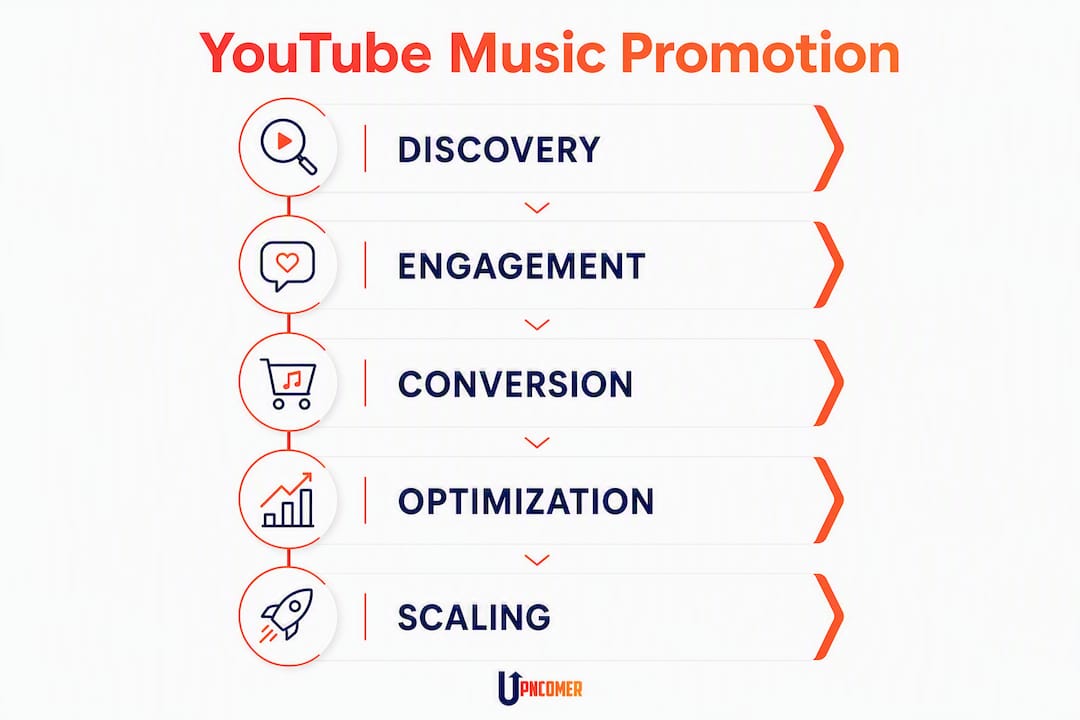
Effective promotion must convert discovery into intent actions like saves, playlist adds, and smart-link clicks. High view counts without conversion signals mean the algorithm is working but the funnel is leaking.
Upncomer’s Amplitude AI and Data Analyst modules are built for exactly this workflow. Amplitude AI surfaces optimization suggestions based on your actual performance data, and the Data Analyst dashboard consolidates YouTube, streaming, and smart-link metrics so you can see the full funnel in one place rather than toggling between platforms. For artists who want to understand why data drives music marketing decisions, the underlying principle is simple: you cannot improve what you cannot measure.
The Publicist and Playlist Pitching modules in Upncomer also automate the outreach workflow from Section 6, reducing the time spent on channel research and follow-up emails.
Pro Tip: Before scaling any ad spend, run a two-week A/B test on your smart link landing page. Test one variable at a time (headline, button copy, or featured platform). A 10% improvement in landing page conversion doubles the value of every dollar you spend on ads.
Key Takeaways
Consistent Shorts output combined with a single conversion metric (smart-link clicks or follows) is the most reliable path to measurable YouTube channel growth for independent artists in 2026.
| Point | Details |
|---|---|
| Shorts drive discovery | YouTube Shorts receive very high daily view counts; prioritize completion rate over video length. |
| One conversion metric | Pick smart-link clicks or follows as your North Star and measure everything against it for 30 days. |
| Waterfall release sequence | Tease → Short → lyric video → official video sustains algorithm momentum across a release window. |
| Paid ads amplify, not fix | Run $100–$300 test budgets per release only after organic conversion signals are present. |
| Upncomer centralizes the workflow | Amplitude AI, Data Analyst, and Growth Engine map directly to the discovery-to-conversion loop above. |
What I would actually do this week as an independent artist
Here is the honest prioritization for a solo artist with one new single, limited time, and a small budget.
The first thing to fix is the channel. Not the music, not the ads. If your About section has no smart link, your banner has no CTA, and your featured video is three years old, every view you earn this week is a wasted opportunity. Spend 45 minutes on that before anything else.
Then film three Shorts from your most recent session. They do not need to be perfect. They need a strong first frame, a hook in the first three seconds, and a completion-worthy length (30–50 seconds). Post one immediately, schedule the other two for Wednesday and Friday.
Set up a premiere for your lead video 48 hours out. Pin a comment with your smart link the moment the premiere goes live. That concentrated traffic window is your best chance to convert casual viewers into followers.
For outreach, pitch five channels this week. Not 50. Five well-researched, genre-matched channels with a short, direct email. Use the template from Section 6. Follow up once in seven days.
If you have any budget at all, put $50 behind your best-performing Short as a Shorts feed ad. Not the official video. The Short. It is cheaper, faster to test, and gives you data within 48 hours.
Time allocation for a solo artist (roughly 8–10 hours per week):
- Content creation and editing: 4 hours
- Publishing, metadata, and scheduling: 1.5 hours
- Analytics review: 30 minutes
- Outreach and community engagement: 2 hours
- Ad management (if running): 30 minutes
If you have zero budget, the waterfall sequence and consistent Shorts output are your entire strategy. If you have $100–$300 per release, add one small ad test after week two. Upncomer’s Growth Engine helps identify which audience segments are responding before you scale spend, so you are not guessing.
Upncomer gives independent artists a full promotional toolkit in one place
Most independent artists are running their promotion across five or six disconnected tools: a separate analytics platform, a smart link service, a scheduling app, a spreadsheet for outreach, and a distributor that does not talk to any of them. That fragmentation costs time and makes it nearly impossible to see the full funnel clearly.
Upncomer is built to replace that stack. The platform combines campaign management, smart links, streaming analytics, fan engagement, AI mastering via UrStudio, playlist pitching through the Publicist module, and distribution into one artist OS. Amplitude AI surfaces optimization suggestions based on your real performance data, and the Data Analyst dashboard shows you the discovery-to-conversion loop from a single screen.

For the workflow in this article specifically: Growth Engine handles audience targeting and lookalike expansion for paid campaigns, Amplitude AI runs A/B test analysis on your creatives, and the Content Creator module helps you batch and schedule Shorts without losing track of metadata. Distribution handles Art Track delivery to YouTube Music so your royalties are captured from day one.
If you are ready to stop managing your promotion in spreadsheets, explore what Upncomer can do for your release or check the latest platform updates and community resources at Upncomer community updates.
Useful sources and further reading
- YouTube for Artists: Release Day Strategy — Official guidance on multi-format release sequencing and Shorts integration.
- YouTube for Artists: Growing Your Audience — Community features, consistent content, and long-term channel growth from YouTube directly.
- Tools4Music: YouTube Music Promotion Guide — Covers monetization mechanics, CPM ranges, and Partner Program thresholds.
- Dynamoi: How to Promote Music on YouTube for Free (2026) — Shorts tactics, completion rate strategy, and RPM considerations.
- Dynamoi: Music Promotion — Convert Attention Into Intent — The case for measuring intent actions over raw views.
- Magnetic Magazine: How to Build an Effective Music Marketing Strategy in 2026 — Platform roles and the email-list-as-fan-ownership argument.
- Upncomer: Music Analytics Practical Guide for Artists — Step-by-step dashboard building and KPI selection.
- Upncomer: Online Music Promotion Explained for Independent Artists — Cross-platform promotion overview and channel strategy.
- InDepthJayBeats: 30-Day Music Marketing Plan — Practical cross-platform marketing structure adaptable across genres.
FAQ
How much does it cost to promote music on YouTube?
A starter paid test runs $100–$300 per release at $5–$15/day for 7–14 days on skippable in-stream or Shorts feed ads. Organic promotion costs nothing beyond your time, though lyric video production typically runs $50–$300 using template tools.
How can I get free music promotion on YouTube?
Post 3 Shorts per week with strong hooks, use a waterfall release sequence (tease → Short → lyric video → official video), pitch 10–15 genre-matched YouTube channels per release, and engage consistently through comments and the Community Tab. Consistent free activity compounds over 3–6 months.
How many views do you need to make $10,000 a month on YouTube?
At a typical music channel CPM of $1–$5, reaching $10,000/month in ad revenue alone would require roughly 2–10 million monthly views. Most independent artists reach that level through a combination of ad revenue, YouTube Music streaming royalties, and other revenue streams rather than ad revenue alone.
Can I get a discount on YouTube Music?
YouTube Music offers student pricing and bundle discounts through YouTube Premium. Pricing and eligibility vary; check YouTube’s official pricing page for current US rates and promotional offers.
What is the single most important metric for YouTube music promotion?
Smart-link clicks or follows, depending on your campaign goal. Views measure reach, but smart-link clicks and follows measure whether discovery is converting into fans, which is the metric that actually scales a music career.