Spotify for Artists Dashboard: What It Is and Why It Matters
If you’ve uploaded music to Spotify and wondered what’s happening on the other side, the Spotify for Artists dashboard is your answer. Understanding what is Spotify for Artists dashboard means recognizing it as a free, dedicated platform where you manage your profile, track listener data, and pitch music directly to Spotify’s editorial team. It’s not just a stats page. It’s the closest thing an independent artist gets to a backstage pass for their own streaming presence, and most artists are barely using half of what it offers.
Table of Contents
- Key takeaways
- What is Spotify for Artists dashboard and how it works
- Core dashboard features and how to navigate them
- Decoding your audience data and streaming stats
- Practical ways to use the dashboard for promotion
- How Spotify for Artists compares to other tools
- Common mistakes artists make with the dashboard
- My take on the real value of this dashboard
- Take your dashboard data further with UpNComer
- FAQ
Key takeaways
| Point | Details |
|---|---|
| Free artist management tool | Spotify for Artists gives every musician free access to profile control, streaming data, and editorial pitching. |
| Four core navigation tabs | The dashboard is organized into Home, Music, Audience, and Profile tabs, each serving a distinct purpose. |
| Audience segments matter | Spotify splits your listeners into active, programmed, and total audience, each requiring different marketing responses. |
| UTC timing affects analysis | All stats are recorded in UTC, so early release data may look different depending on your local time zone. |
| Pitching is a built-in tool | You can pitch unreleased music directly to Spotify playlist editors from inside the dashboard at no cost. |
What is Spotify for Artists dashboard and how it works
The Spotify for Artists dashboard is a dedicated management platform that gives musicians direct control over their presence on Spotify. Think of it as the control room behind your streaming profile. While regular listeners see your profile page and press play, you see everything underneath: who’s listening, where they are, how they found your music, and what’s resonating.
There’s a common misconception that Spotify for Artists is just a reporting tool, something you check once a month to see if your streams went up. That’s underselling it significantly. The dashboard is designed to drive promotional and release cycle actions, blending analytics with the creative side of your career. You can update your artist profile, manage your Artist’s Pick, pitch new songs before they go live, and track real-time performance all in one place.
Accessing Spotify for Artists is straightforward. You sign in at artists.spotify.com using your Spotify account, then claim your profile if you haven’t already. Your music distributor can also help with profile verification. Once you’re in, you have full access to every Spotify artist tool the platform provides.
Core dashboard features and how to navigate them
The dashboard is organized around four main tabs: Home, Music, Audience, and Profile. Each one has a specific job, and knowing what to look for in each saves you a lot of time.
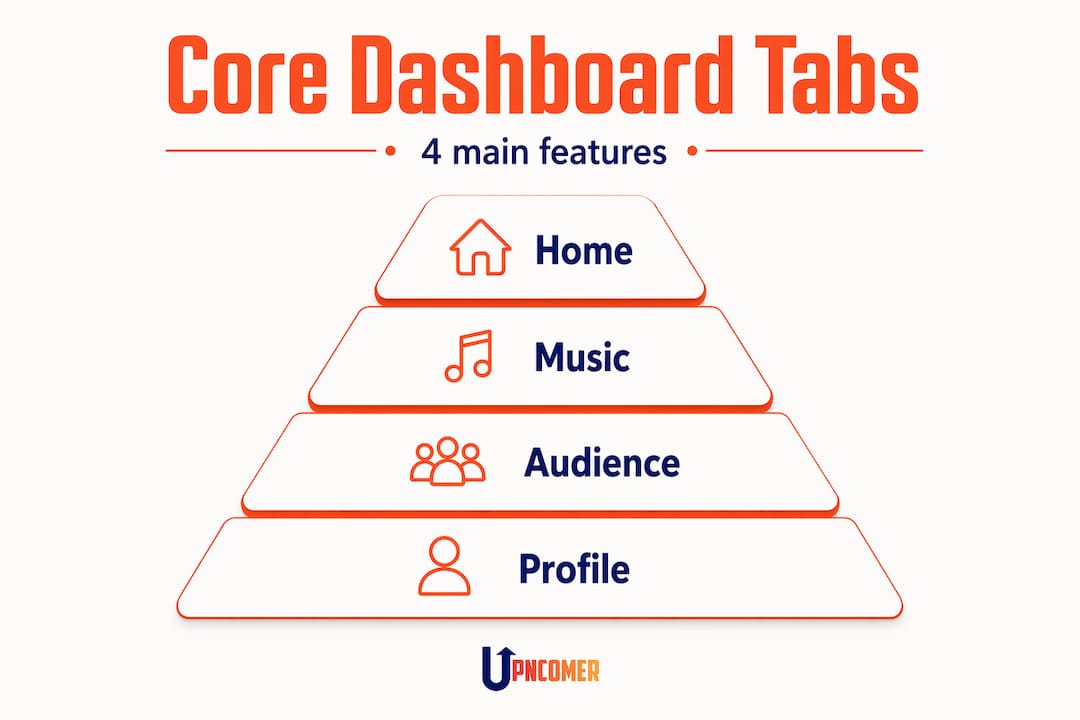
Home gives you a snapshot of recent activity. It surfaces your most-streamed songs, recent listener counts, and any notifications about playlist adds or editorial selections. It’s a quick-read summary you can scan in under a minute.
Music is where you dig into track-level data. You can see individual song performance, stream counts, saves, playlist adds, and skip rates. This is where you start to understand which songs are connecting and which ones are getting skipped after ten seconds.
Audience pulls back to show you the bigger picture of who your listeners are. More on this in the next section, but this tab covers demographics, locations, and how your listener base is growing over time.
Profile is your creative control room. You can update your artist photo, write or edit your bio, and set your Artist’s Pick, which is a featured song, album, or playlist displayed at the top of your Spotify profile. Profile customization options include adding links to your social media, merchandise store, or personal playlists, which turns your Spotify page into a genuine fan hub rather than just a music library.
Pro Tip: The dashboard is available on desktop and mobile, so you can check your release-day stats from your phone without needing a laptop open. Set up the mobile app before your next drop.
Decoding your audience data and streaming stats
This is where the Spotify for Artists dashboard earns its reputation as one of the most useful free tools in music. The Audience tab goes well beyond a simple stream count.
Audience data includes location, platform, device, gender, and age, giving you a genuine picture of who your listeners actually are. If you’ve been assuming your audience is mostly local fans, you might be surprised to find a growing cluster of listeners in a city you’ve never played. That’s not trivia. That’s tour planning data.

One of the most misunderstood features is the audience segmentation system. Spotify divides your listeners into three segments: active listeners, programmed listeners, and total audience over a two-year window. Here’s what those actually mean:
| Segment | Time Window | What it tells you |
|---|---|---|
| Active audience | 28 days | Fans who intentionally seek out your music and engage with it most recently |
| Programmed listeners | 28 days | Listeners who discover you through algorithmic playlists and radio |
| Total audience | 2 years | Everyone who has streamed your music across all sources |
The distinction between active and programmed listeners matters more than most artists realize. Successful artists use the dashboard to deepen engagement with active listeners rather than just chasing raw stream numbers. A song pushed to millions via algorithm can look impressive on the surface but deliver almost no lasting fan connection.
Source of streams data breaks down plays by where they originated: playlists, your artist profile, a listener’s library, radio, or algorithmic sources like Discover Weekly. If most of your streams come from algorithmic playlists, you have reach but not loyalty. If streams are coming from library saves and direct profile visits, those are your real fans.
“For accurate analysis, artists must track streams by source and respect differing time horizons to evaluate fan growth properly.” — Spotify for Artists Support
One technical detail that catches artists off guard: all stats are recorded in UTC. If you release music at midnight in New York, that’s 5am UTC. Your release-day data might look thin on the dashboard until the full day catches up. This isn’t a glitch. It’s a time zone issue worth accounting for.
Practical ways to use the dashboard for promotion
Knowing what the data says is step one. Using it to actually grow your career is where most independent artists leave value on the table. Here are the highest-impact ways to put the Spotify for Artists dashboard to work.
-
Pitch unreleased tracks to editorial playlists. This is one of the most underused Spotify artist tools available. Pitching unreleased music directly to Spotify’s editorial team is built into the dashboard. You can submit a track before it goes live, describe the mood, genre, and context, and let the team consider it for curated playlists. You need to pitch at least seven days before release for it to be considered.
-
Use audience location data to plan releases and outreach. If your Audience tab shows a concentration of listeners in Chicago and São Paulo, those cities deserve targeted attention. Consider timing social posts to reach those time zones, or exploring playlist pitching strategies tailored to regional curators.
-
Refresh your Artist’s Pick before every major release. Most artists set it once and forget it. Change it when you drop something new. It’s the first thing a curious listener sees when they land on your profile.
-
Track campaign results with source-of-streams data. If you run a social ad campaign pointing fans to a specific song, watch whether your direct profile visits increase during that window. This is how you connect music campaign management strategies to real streaming behavior.
-
Update your bio when your story changes. New collaborations, recent press mentions, tour announcements. Your Spotify bio is often the first place a label, curator, or new fan reads about you. Keep it current.
Pro Tip: When pitching to Spotify editors, pick one song per release cycle and be specific about the context. “Indie folk with alt-country influence, written after moving cities” gives editors something to work with. Vague pitches get passed over.
How Spotify for Artists compares to other tools
Spotify for Artists is powerful, but it’s not everything you need. Knowing where it excels and where it stops is part of using it well.
| Feature | Spotify for Artists | Third-party music platforms |
|---|---|---|
| Editorial playlist pitching | Built-in, free | Not available directly |
| Spotify-specific audience data | Deep and real-time | Limited or estimated |
| Cross-platform analytics | No | Yes (via aggregators) |
| Campaign management | Basic | Advanced |
| AI-driven music career tools | No | Available via platforms like UpNComer |
| Fan engagement systems | Minimal | Extensive |
Where Spotify for Artists is unmatched: it’s the only place you can pitch directly to Spotify’s editorial team and see native platform data. No third-party tool replicates that.
Where it falls short: it only shows you what’s happening on Spotify. If you’re releasing across multiple platforms and running paid ads, you’re working with an incomplete picture. Tools that pull in cross-platform streaming data, manage ad spend, and help you plan releases give you something the dashboard alone cannot.
Some artists use the dashboard alongside platforms like UpNComer, which combines streaming analytics, AI-driven guidance, and release planning in one place. The combination covers what Spotify handles natively and fills in the gaps.
Common mistakes artists make with the dashboard
Even artists who use the dashboard regularly fall into predictable traps. Avoiding these saves you from making decisions based on bad conclusions.
- Comparing metrics across different time windows. Monthly listeners use a 28-day window, while total audience spans two years. Seeing your monthly listeners drop while your total audience holds steady is normal. Panicking because of that difference is not.
- Ignoring UTC when checking release-day data. If your stats look unexpectedly low in the first few hours after a drop, UTC-based timestamps are almost always the reason. Wait 24 hours before drawing conclusions.
- Obsessing over stream counts instead of saves. A save means someone liked your song enough to come back to it. That behavior is a far stronger signal of a real fan than a passive stream from an algorithmic playlist.
- Skipping the source-of-streams breakdown. If you never check where your streams are actually coming from, you can’t identify whether your marketing is working or whether an algorithm is doing all the heavy lifting.
Pro Tip: Check your artist development progress alongside your dashboard data. Streaming stats tell you what’s happening. Artist development frameworks help you understand why and what to do next.
My take on the real value of this dashboard
I’ve seen a lot of independent artists treat the Spotify for Artists dashboard like a scoreboard. They check streams after a release, feel good or feel bad, and close the tab. That’s a missed opportunity every single time.
What I find most useful about the dashboard isn’t the raw numbers. It’s the source of streams breakdown and the audience segmentation. Those two features together tell you something no PR person or playlist curator can: whether the people finding your music are choosing to come back.
In my experience, the artists who grow sustainably are the ones treating their active listeners as their real audience, not their total streams. A thousand saves from people who actually love your music will carry you further than a million algorithmic plays from listeners who never clicked follow.
The dashboard has evolved considerably, and Spotify positions it as a tool for action throughout the full release cycle, not just post-release reflection. I think that framing is right. Use it before a drop to pitch. Use it during the first week to monitor where streams are coming from. Use it a month later to understand how the audience shifted. That’s the full picture.
Where I’d push back slightly: the dashboard still leans heavily toward streaming behavior. It doesn’t tell you much about your fans as people. For that, you need to be building connections outside of Spotify too, through email lists, social engagement, and live shows. The data here supports that work. It doesn’t replace it.
— Karan
Take your dashboard data further with UpNComer

The Spotify for Artists dashboard gives you native platform data that no third-party tool can replicate. But once you have that data, the next question is: what do you actually do with it? That’s where UpNComer comes in. Built specifically for independent artists, UpNComer brings together streaming analytics, AI-powered career guidance through Amplitude AI, ad campaign management, playlist pitching support, and fan engagement tools in one place. Instead of toggling between disconnected apps, you get a single ecosystem where your Spotify insights feed directly into your release strategy. If you’re serious about turning data into decisions, explore what UpNComer’s Growth Engine and Artist Manager modules can do for your next campaign.
FAQ
What is the Spotify for Artists dashboard used for?
The Spotify for Artists dashboard lets musicians manage their artist profile, track streaming performance, view audience demographics, and pitch unreleased music to Spotify’s editorial playlist team.
How do I start accessing Spotify for Artists?
Sign in at artists.spotify.com with your Spotify account and claim your artist profile. Your music distributor may also help verify your profile to unlock full dashboard access.
What audience segments does Spotify for Artists show?
Spotify divides your listeners into active audience, programmed listeners, and total audience, each measured over different time windows to reflect different levels of fan engagement.
Why do my Spotify stats look low right after a release?
All Spotify stats are recorded in UTC, so depending on your local time zone, early release-day numbers may appear lower than expected. Wait a full 24 hours before drawing any conclusions from the data.
Can I pitch my music to playlists through the dashboard?
Yes. Spotify for Artists includes a built-in editorial pitch tool that lets you submit unreleased tracks directly to Spotify’s playlist editors, at no cost, at least seven days before your release date.