Shazam for Artists: Verify Your Profile and Read the Data
You get Shazam analytics by claiming your artist profile in Apple Music for Artists, then requesting verification through Shazam. Once you’re verified, the dashboard opens up Shazam Insights, Places, Shazam Charts, and your Shazam Count, turning offline discovery moments into a real map of where your streams and fans are coming from.
The fastest path there looks like this:
- Sign up for a free Apple Music for Artists account.
- Request verification at Connect.
- Confirm your distributor has your metadata and artist name locked in correctly.
Once you’re through, you’ll immediately see:
- Shazam Insights (who’s identifying your songs, broken down by demographics)
- Places (where those identifications are happening, down to the city)
- Shazam Count and Shazam Charts (how much traction you’re getting and whether you’re charting)
Key Takeaways
Shazam analytics only become useful once you’ve verified your artist profile in Apple Music for Artists and start reading Places, Insights, and Charts as a weekly habit, not a one-time check.
| Point | Details |
|---|---|
| Verification is the gateway | Sign up for Apple Music for Artists and request verification at connect.shazam.com before any Shazam data appears. |
| Metadata errors cause most delays | Mismatched artist names or duplicate profiles across distributors are the top reasons verification stalls. |
| Counts update on separate schedules | Shazam Count and Charts refresh roughly every 24 hours but run through separate systems, so small mismatches are normal. |
| Places data drives real decisions | Use city-level identification data to prioritize tour stops and localized ad spend. |
| UpNComer connects the data to action | Growth Engine and Amplitude AI turn Shazam Places and Insights into targeted ad tests and city prioritization. |
Table of Contents
- How Do You Verify Your Artist Profile for Shazam Analytics?
- Where Shazam Data Lives Inside Apple Music for Artists
- What Do Shazam Count and Charts Actually Measure?
- Turning Shazam Data Into Bookings, Ads, and Streams
- Making Your Shazam Profile Easier to Discover
- Put Your Shazam Data to Work Without Juggling Five Tools
- Sources
- FAQ
How Do You Verify Your Artist Profile for Shazam Analytics?
Verification isn’t complicated, but it’s easy to stall out on if your metadata’s messy. Here’s the sequence that actually gets you through without a support ticket.
- Gather your assets first. You’ll want a high-resolution photo, links to your social profiles, and an email address tied to your artist brand, not a personal inbox you’ll forget.
- Confirm your release is live. Check with your distributor that the track has fully propagated to Apple Music and Shazam’s catalog. This usually takes a day or two after release, sometimes longer for new artists.
- Sign in to Apple Music for Artists using the same Apple ID you’ll manage long term.
- Request verification at connect.shazam.com and follow the identity confirmation prompts.
- Confirm ownership when Apple or Shazam reaches out, usually through email or an in-dashboard prompt.
Most artists get through in a few days. The delays almost always trace back to one of three things: metadata that doesn’t match across platforms, duplicate artist entries created by different distributors, or a distributor that hasn’t finished delivering your release to Shazam’s system.
Pro Tip: Before you request verification, run your artist name, spelling, and featured-artist credits through every platform where your music lives. A mismatched name between Spotify and Apple Music is one of the most common reasons Shazam attributes a “find” to the wrong profile or fails to attribute it at all.
If you’ve got multiple artist profiles floating around from old uploads, flag it during verification. Shazam and Apple can merge them, but only if you ask.
Where Shazam Data Lives Inside Apple Music for Artists
Once you’re verified, four sections inside the dashboard matter most, and each one answers a different question about your audience.
- Overview: your at-a-glance snapshot, showing Shazam Count trends alongside your streaming numbers so you can spot spikes fast.
- Shazam Insights: demographic breakdowns of who’s identifying your music by age and gender, which helps you sanity-check who your ads are actually reaching.
- Places: country, region, and city-level identification data. This is the closest thing you’ll get to a real-time map of where curiosity about your music is happening.
- Shazam Charts: shows whether your track is charting, and how its position moved over the past week.
| Dashboard Section | What It Shows | Best Used For |
|---|---|---|
| Overview | Shazam Count and streaming trends together | Spotting sudden spikes in interest |
| Shazam Insights | Age and gender demographics | Refining ad audience targeting |
| Places | City and regional identification counts | Picking tour stops and local ad zones |
| Shazam Charts | Chart position and weekly movement | Timing press pushes and playlist pitches |
Chart data refreshes every 24 hours, but the Apple Music for Artists dashboard processes Shazam Count and chart placement on separate schedules, so don’t panic if one updates before the other.
What Do Shazam Count and Charts Actually Measure?
Shazam Count is a raw tally of how many times someone identified your song using the app. It sounds simple, but it isn’t a one-to-one match with what you’ll see in the public Shazam app, because Apple’s own documentation confirms artist-facing counts and consumer-facing counts run through separate systems.
That gap matters more than it looks.
Why your numbers might not match: Shazam’s fingerprinting engine often attributes an identification to whichever version of a song it judges the closest match, typically the most popular release. If you’ve got a remix or alternate edit in circulation, its identifications may get folded into the original version’s count instead of its own, according to reporting on Shazam’s matching behavior.
A few other things worth knowing:
- Charts refresh on a 24-hour cadence, so day-over-day comparisons are meaningful; hour-by-hour ones aren’t.
- “Trending on Shazam” and the weekly notification emails trigger automatically once your identification volume crosses a threshold relative to your baseline. You can’t manually turn them on, but keeping your profile verified and your releases current keeps you eligible.
Turning Shazam Data Into Bookings, Ads, and Streams
Data sitting in a dashboard doesn’t grow your career. Acting on it does. Here’s a workflow that turns raw Shazam signals into decisions you can actually make this week.
Start with Places. If three cities keep showing up as your top identification zones and you’ve never played a show in any of them, that’s not a coincidence. It’s a signal that people are discovering you locally, often through radio, a friend’s playlist, or a bar’s speaker system, and that’s exactly the kind of top-of-funnel moment Shazam was built to catch. Prioritize those cities for a micro-tour or a local radio push before you spend money guessing.

Next, cross-reference Shazam Insights demographics against your streaming analytics. If Shazam shows a younger skew than your Spotify listener base, that’s often an early signal of a track catching on with a new audience segment before the streaming numbers reflect it.
From there, build localized ads and smart links targeting your top Shazam cities, then track whether that traffic actually converts into follows and streams.
Inside UpNComer, this workflow maps cleanly onto existing modules. Feed your Shazam Places data into Growth Engine to build geo-targeted ad tests, let Amplitude AI flag which cities are accelerating fastest, and use Distribution to confirm your metadata is clean before you scale any campaign around it.
Pro Tip: Set a recurring weekly check-in, even fifteen minutes, to scan Places and Charts for movement. Rising cities and unexpected demographic shifts are early signals, and they go stale fast if you’re only checking once a month.
Making Your Shazam Profile Easier to Discover
A verified profile is the baseline. An optimized one is what actually converts casual identifications into fans who stick around.
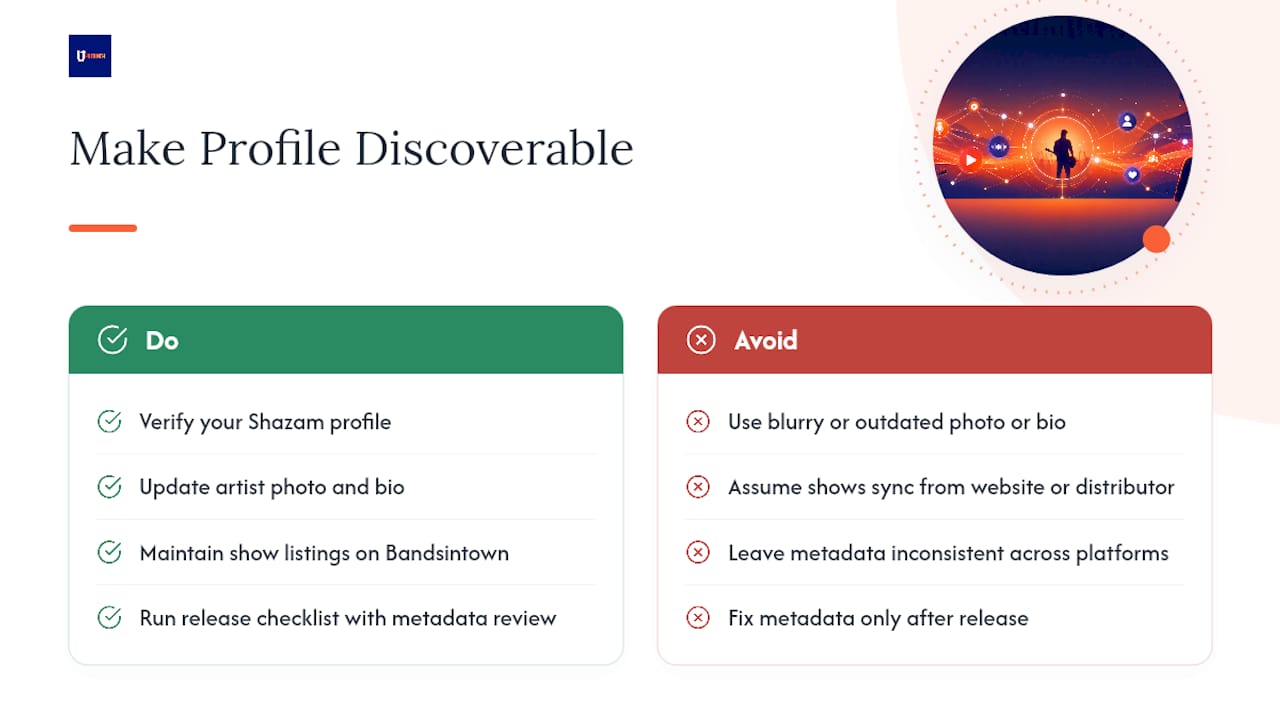
Start with your artist photo and bio. Shazam pulls this directly from your connected Apple Music for Artists profile, so a blurry photo or an outdated bio undersells you the moment someone taps to learn more after identifying your track. Update both whenever you release something new.
Tour dates matter more than most artists realize. Shazam doesn’t pull show listings from your distributor or your website. It surfaces them through a connected events partner, and Bandsintown’s integration with Shazam is the mechanism that makes this work. If you’re not maintaining your events there, your Shazam profile will look like you never play live, even if you’ve got a tour booked.
Metadata consistency across every platform you distribute to reduces misattribution, especially for remixes, live versions, or alternate mixes that might otherwise get folded into your original release’s count. Keep artist name spelling, featured credits, and release titles identical everywhere.
Finally, treat every release like a discoverability event, not just a streaming one. Run through a release checklist that includes metadata review before your track goes live, not after you notice something’s off in the dashboard.
Why Shazam deserves a permanent spot in your release plan
Shazam catches the exact moment someone hears your song somewhere they can’t just tap a share button, a store, a car radio, a friend’s party, and turns it into a name and a link. That’s a discovery signal most artists ignore because it’s not as loud as a streaming number. Check it weekly, not monthly, and treat every release like it needs a Shazam-specific look, not an afterthought.
Put Your Shazam Data to Work Without Juggling Five Tools
Shazam tells you where curiosity is happening. UpNComer is where you act on it without bouncing between five different logins to do it. Once your Places and Insights data show you which cities are heating up, Growth Engine turns that into a geo-targeted ad test in minutes, and Amplitude AI flags which of those cities are accelerating fast enough to justify a tour stop.

Before any of that works, though, your metadata has to be clean. That’s where Distribution comes in: it confirms your release information matches across platforms so Shazam attributes identifications to the right version of your track instead of folding a remix into your original’s count.
If you’re ready to connect the dots between what Shazam is telling you and what you actually do next, here’s where to start:
- Sign up for an UpNComer trial and connect your release catalog
- Run a “top city” ad test through Growth Engine based on your current Places data
- Use Distribution to double check your metadata before your next verification request
- Check community updates to see how other independent artists are structuring their release workflows
Sources
FAQ
Do Artists Get Paid From Shazam?
Shazam itself doesn’t pay artists directly. It’s a discovery tool that routes listeners to streaming platforms, where your existing royalty agreements apply once someone plays the song there.
What App Can I Use to Identify Music Artists?
Shazam remains the dominant song identification app, letting listeners tap to identify tracks playing in the room, on the radio, or inside apps like TikTok and Instagram, according to its App Store listing.
What Replaced Shazam?
Nothing has replaced Shazam. Apple acquired it and folded its identification technology directly into Apple Music and Siri, while the standalone Shazam app and its artist-facing tools continue to operate.
Can I Use Shazam for Free?
Yes, the Shazam app is free for listeners to identify music, and claiming your artist profile through Apple Music for Artists and Shazam’s verification portal costs nothing either.
How Often Does Shazam Chart Data Update?
Shazam Charts refresh roughly every 24 hours inside Apple Music for Artists, though your Shazam Count may process on a slightly different schedule than your chart position.