Avoid Wasted Ad Spend: Pair Pixel and CAPI for Musicians’ Smartlinks
Install the Meta Pixel and TikTok Pixel (plus a GA4 measurement ID) on whatever page actually hosts your conversion, usually your smartlink or pre-save page, not just your artist website. Then set your smartlink’s click-out to a streaming platform as a custom conversion, and pair every browser event with the Conversions API before you spend a single dollar on ads. That’s the whole game. Everything else is detail.
TL;DR:
- Installing pixels only on pages where conversions occur, like smartlinks and merch pages, ensures accurate tracking of actual performance data.
- Pairing server-side Conversions API with browser pixels using shared event IDs minimizes double-counting and improves measurement accuracy.
- Focusing on key events such as click-outs, pre-saves, and merch purchases helps optimize campaigns and reduces wasted ad spend.
- Testing pixel firing with real click-outs before launching ads is essential to identify common issues like domain permissions or incorrect event setup.
- Using a unified platform that manages pixels, traffic permissions, and analytics simplifies setup, troubleshooting, and ongoing campaign management.
Table of Contents
- Why Musicians Need a Pixel Setup for Their Music Ads
- Which Pixels and IDs Should You Actually Install?
- Where You Need to Put the Pixel: Site, Smartlink, and Merch Pages
- How to Set Up the Meta Pixel and Pair It With Conversions API
- Which Events Actually Matter for a Music Campaign
- Building Retargeting Audiences That Actually Convert
- How to Test Your Pixel and Fix Common Errors
- Privacy Limits and Why Conversions API Matters
- How UpNComer Helps Wire Pixels, Smartlinks, and CAPI
- What Actually Trips Up Most Musicians’ Pixel Setups
- A Simpler Way to Keep Your Tracking Consistent
- Sources
- FAQ
Why Musicians Need a Pixel Setup for Their Music Ads
A tracking pixel is a small snippet of code that reports back to Meta, TikTok, or Google every time someone loads a page or takes an action on it. For musicians running paid campaigns, that data is what separates guessing from optimizing. Without it, an ad platform has no idea whether the person who saw your ad actually clicked through to Spotify, saved your pre-save, or bought a hoodie.
Once the pixel is firing correctly, three things become possible:
- Retargeting: you can serve a follow-up ad specifically to people who visited your smartlink but didn’t click through to a DSP.
- Lookalike audiences: the ad platform builds a new audience that resembles your best converters, not just anyone who clicked a like button.
- Conversion optimization: campaigns spend more of their budget on people statistically likely to complete your target action, which tends to lower your cost-per-click-out over time.
A pre-save funnel, a DSP click-out, or a merch checkout all depend on the same underlying signal: reliable event data.
Which Pixels and IDs Should You Actually Install?
You don’t need every tracking tool available. You need the two or three that match where your ad budget is going.
- Meta Pixel: essential if you’re running Facebook or Instagram ads. It powers retargeting and lets Meta optimize toward your click-out event instead of just impressions.
- TikTok Pixel: install this if you’re spending on TikTok ads or leaning on TikTok for discovery. It feeds TikTok’s algorithm the same kind of conversion signal Meta needs.
- GA4 measurement ID: not an ad pixel exactly, but a cross-channel measurement layer that helps you sanity-check attribution across platforms and catch discrepancies between what Meta reports and what actually happened.
If you’re running a single small campaign on one platform, skip the extras. A TikTok Pixel does nothing useful if you’re not buying TikTok traffic, and a cluttered analytics setup is often harder to troubleshoot than a lean one.
Where You Need to Put the Pixel: Site, Smartlink, and Merch Pages
Pixels only report on the page they’re installed on. That sounds obvious, but it’s the single most common gap in a musician’s setup: the pixel lives on the artist site, while the actual conversion (the DSP click-out) happens on a completely different domain.
- Your artist website, if it hosts any part of the funnel your ads point to, from a landing page to a merch store.
- Your smartlink or pre-save domain, since this is usually where the real conversion, the click through to Spotify, Apple Music, or another DSP, actually fires. This domain needs to be explicitly allowed in Meta’s traffic permissions or browser events from it will be silently ignored.
- Your merch or ticketing store, if purchases are part of what you’re optimizing campaigns toward.
Custom verified domains you control give you more flexibility with event naming and permissions than third-party default domains from a smartlink vendor. If you’re using a hosted smartlink tool, check whether it lets you connect a custom domain. That control usually pays off once you start running serious ad spend.
How to Set Up the Meta Pixel and Pair It With Conversions API
This is the sequence that matters most, because the smartlink click-out to a DSP is the conversion worth optimizing, not a generic pageview.
- Create your pixel in Meta Business Manager and copy the Pixel ID it generates.
- Add the Pixel ID to your site’s header code, a tag manager, or directly into your smartlink provider’s pixel settings field.
- Define the click-out as a custom conversion. Set your campaign objective to optimize toward that event, not toward traffic or engagement broadly.
- Pair browser events with the Conversions API, and pass the same
event_idon both the browser and server event so Meta can deduplicate them instead of double-counting. - Verify server events are actually arriving in Events Manager before you scale spend.
Run this checklist before launch: install Facebook Pixel Helper in your browser and confirm the pixel fires on page load, check Events Manager’s “Received Events” tab for your custom conversion, then do one real test click-out through your actual ad URL on a mobile device.
Pro Tip: If your smartlink vendor offers built-in Conversions API support, enable it before you try to build a custom server pipeline yourself. It’s usually faster to configure and easier to maintain than a bespoke solution, and it still lets you dedupe events at the ad platform level.
Which Events Actually Matter for a Music Campaign
Not every event deserves equal attention. Some are diagnostic, some are your actual revenue signal.
- PageView and ViewContent: standard events that confirm the pixel is alive and firing, useful for troubleshooting more than optimization.
- Click-out to a DSP: your primary custom conversion, the one campaign objectives should be built around.
- PreSave, PlaySong, SaveTrack: custom events worth tracking around a release, especially in the weeks before a drop.
- AddToCart, Purchase: essential if merch or physical product sales are part of the funnel.
- Lead: relevant if you’re collecting emails or fan sign-ups through a landing page.
- ShareContent: a softer engagement signal, useful for building lookalikes even before someone converts.
Once these events are firing reliably, you can build campaign structures that include people who triggered a high-value event and exclude people who already converted, which keeps your ad spend from being wasted on fans who already streamed the song.
Building Retargeting Audiences That Actually Convert
Raw pixel data only becomes useful once it’s shaping who sees your next ad. Structure your audiences around how recently someone acted, and how meaningfully.
- Click-out visitors, 7 to 30 day lookback: people who reached your smartlink but didn’t finish the click-through. A tight retargeting window here often outperforms broader engagement audiences.
- Video engagers, 1 to 14 day lookback: shorter windows work better here since attention fades fast after someone watches a clip.
- Lookalikes built from click-outs or purchases: these tend to outperform lookalikes built from likes or video views, since they’re modeled on people who took a real action, not a passive one.
A typical sequence moves from broad awareness ads, to retargeting engaged viewers, to a conversion push aimed at people who already visited the smartlink. For an emerging artist working with a limited budget, weighting spend toward the retargeting and conversion stages usually produces a better return than spreading it evenly across all three. Building these audiences off structured audience research rather than guesswork tends to shorten the learning curve considerably.
Pro Tip: Don’t rebuild your audiences from scratch for every release. Layer new click-out data onto existing retargeting pools so each campaign compounds the last one instead of starting cold.
How to Test Your Pixel and Fix Common Errors
Before any real ad spend goes live, run the diagnostic sequence: open your ad’s URL on a mobile device, click through the DSP button on your smartlink, then confirm a single event with a matching event_id shows up in both Events Manager and your server-side logs.
- Use Facebook Pixel Helper in-browser to confirm the pixel loads and fires on the correct trigger, not just on page load.
- Check Events Manager diagnostics for duplicate events, a sign your browser and server events aren’t sharing an
event_idcorrectly. - Common mistake: the pixel is set to trigger on pageview instead of the click-out button, so it reports traffic but never reports the actual conversion.
- Common mistake: the pixel is installed on your artist site, but the click-out happens on a smartlink domain that was never added to your allowed traffic permissions.
- If Events Manager shows little or no activity, check the domain of origin first. That’s usually where the break is.
Privacy Limits and Why Conversions API Matters
Browser-based tracking has real gaps now, and pretending otherwise leads to wasted ad spend. iOS App Tracking Transparency prompts and ad blockers both suppress a meaningful share of browser-side pixel events, which starves your campaign of the learning signal it needs to optimize.
- Pairing browser events with Conversions API sends the same event from your server, which captures conversions that browser tracking alone misses.
- Always pass a shared
event_idbetween the browser and server event so Meta deduplicates them instead of counting one click-out as two conversions. - Confirm your smartlink domain is explicitly allowed in Meta’s traffic permissions, or browser events from that domain get rejected outright, even if the pixel code is technically correct.
Pairing pixel and CAPI data with a shared event_id has become the standard approach for getting accurate counts in the post-iOS-privacy environment, and it’s worth treating as a baseline requirement rather than an advanced step.
Test both paths together: click through your ad URL, then confirm the same event_id appears once in Events Manager and once in your server logs, not twice.
How UpNComer Helps Wire Pixels, Smartlinks, and CAPI
Manually wiring pixels, traffic permissions, and Conversions API across a smartlink, an artist site, and a merch store takes real technical patience, and most independent musicians would rather spend that time writing songs. The platform keeps ad campaign management, streaming analytics, and smart links inside one system, so pixel and CAPI events stay consistent across a release instead of breaking every time you launch something new.
- Growth Engine manages ad campaigns and keeps conversion events aligned with your actual goals, not just impressions.
- Amplitude AI interprets the pixel and analytics data flowing in, so you’re not stuck reading raw Events Manager exports.
- Data Analyst surfaces streaming and audience data in one dashboard instead of three separate logins.
- Distribution ties release timing to the tracking setup, so click-out data lines up with your actual release calendar.
DIY setup makes sense for a single, simple campaign. Once you’re running multiple release cycles, multiple ad platforms, or you’re hitting technical walls with CAPI, a unified platform usually saves more time than it costs.
What Actually Trips Up Most Musicians’ Pixel Setups
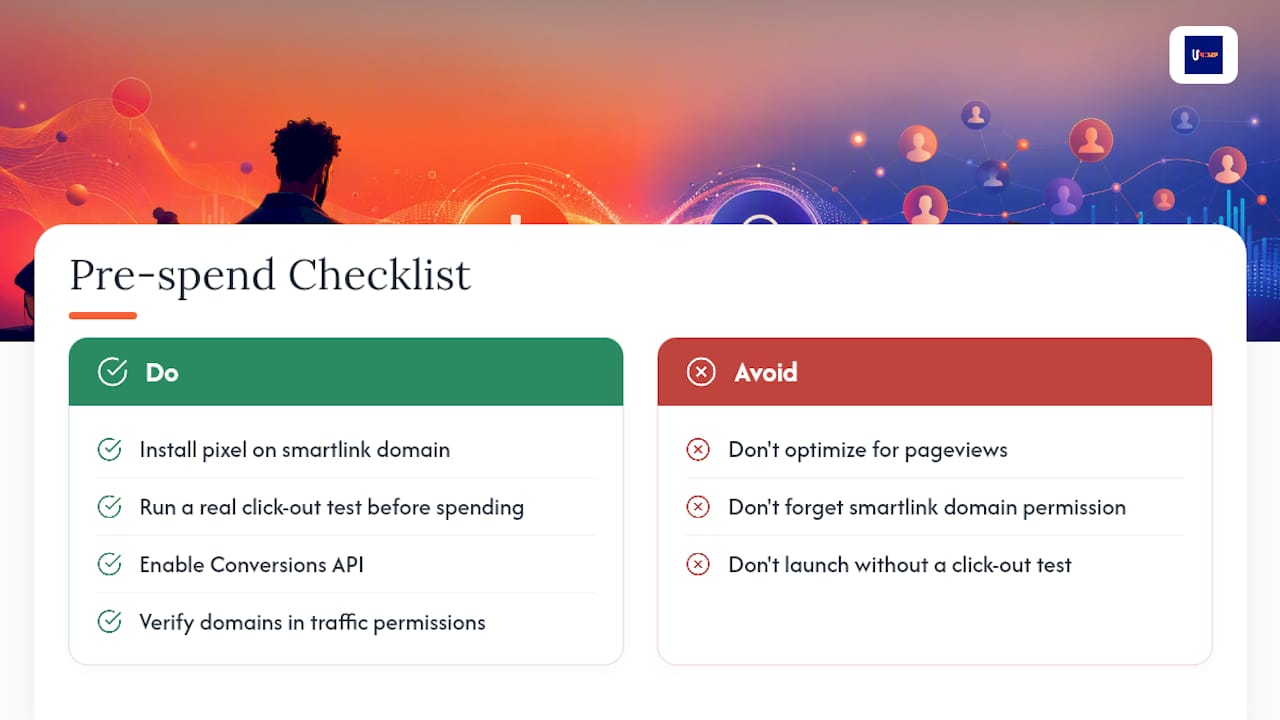
The checklist is short: pixel installed on the smartlink domain (not just your artist site), a real test click-out completed before spend, Conversions API enabled, domains verified in traffic permissions, and a willingness to start small and adjust based on what the data actually shows.
Three mistakes account for most of the wasted ad spend I see. First, optimizing for the wrong event, usually a pageview instead of the click-out that actually matters. Second, forgetting to allow the smartlink domain in traffic permissions, which quietly blocks browser events even when the pixel looks correctly installed. Third, launching a campaign without ever testing a real click-out first. None of these require deep technical skill to avoid. They just require checking before you spend.
— Karan
A Simpler Way to Keep Your Tracking Consistent
If wiring pixels, traffic permissions, and Conversions API across three different domains sounds like more troubleshooting than you signed up for, that instinct is fair. Some platforms keep campaign management, smart links, and streaming analytics inside one connected system, so your click-out events, pre-save funnels, and merch conversions don’t depend on you remembering five separate settings across five separate tools.

Instead of rebuilding tracking logic for every release, the platform’s Distribution tools keep your release workflow and conversion tracking tied together from the start, and if you’re selling merch or production services alongside your music, a tool like Payhip pairs well with pixel-tracked purchase events on that end of the funnel. If you’d rather have your smartlinks and campaign wiring set up correctly the first time instead of debugging it after a launch, take a look at UpNComer’s platform and see whether a guided setup fits where you’re at.
Sources
The setup steps above draw on Meta’s own traffic permissions documentation, practical guides on Meta Pixel configuration for music ads and domain allow-listing, and Conversions API pairing guidance built specifically for musicians. Menu names and interfaces change often on ad platforms, so check the original vendor docs before you configure anything for a live campaign.
- Conversion Ad Creative for Musicians: A Guide | AndR. Learning Center
- Meta Pixel Traffic Permissions for Music Ads | VLVTN
- Facebook Business Help — traffic permissions / pixel guidance
FAQ
What Does Pixel Setup Mean for Musicians?
It means installing a tracking snippet, usually the Meta Pixel or TikTok Pixel, on the pages that host your music ads’ conversion, then wiring the right events so campaigns can optimize toward real outcomes like DSP click-outs or merch purchases.
What Is a Facebook Pixel Used For?
A Facebook Pixel (technically the Meta Pixel) reports page views and specific actions back to Meta’s ad system, which powers retargeting, lookalike audience creation, and conversion-based campaign optimization.
How Do I Download Music to a Pixel Phone?
This question usually refers to Google Pixel smartphones, not advertising pixels; music can be downloaded through a streaming app like Spotify or Apple Music directly on the device and has no connection to pixel tracking for ads.
Do I Need Both a Pixel and Conversions API?
Yes. Browser pixels alone miss conversions due to iOS privacy settings and ad blockers, so pairing them with Conversions API and a shared event_id gives you a more complete picture of what’s actually converting.
Is “Pixel” in Pixel Music the Same as an Ad Tracking Pixel?
No. Pixel Music is a music sequencer app that turns image pixels into melodies, which is unrelated to the tracking pixels used for Meta or TikTok ad campaigns.