AI for Musicians: Practical Workflows and Tool Checklist
AI for musicians speeds the idea-to-demo cycle, automates routine production tasks, and supports promotion — when you use it with deliberate curation and clear licensing. Berklee faculty frame it as an extension of your creative process, not a replacement for your taste. SAE Institute puts it plainly: AI provides the tools; you supply the direction. Platforms like Upncomer are built around exactly that balance, combining AI-powered guidance with the distribution, analytics, and marketing infrastructure independent artists actually need.
Before you adopt any tool, here’s what matters most:
- AI can generate MIDI sketches, arrangements, stems, mastered audio, and promotional copy with minimal prompts.
- It works best as a prototyping engine — generate many versions fast, then apply your judgment to choose and refine.
- Output ownership varies wildly by tool; always verify commercial-use rights in the terms of service before publishing.
- Training data transparency is uneven across the industry — opt-in policies matter for ethical use.
- Human curation, emotional intent, and final mix decisions remain yours to make.
Table of Contents
- What AI can actually do for musicians right now
- How to stitch AI into songwriting, production, and promotion
- Ethics, copyright, and licensing: what U.S. musicians must check
- How to pick an AI tool: the checklist that actually matters
- What AI won’t do: the limits you need to know
- How Upncomer maps AI into your artist workflow
- Data privacy and security when using AI music tools
- Key Takeaways
- The honest case for AI adoption
- Upncomer gives you an integrated AI workflow, not another disconnected tool
- Further reading and authoritative sources
- FAQ
What AI can actually do for musicians right now
Berklee’s overview confirms that AI can write multiple song versions, generate audio in different styles, master audio, and draft promotional materials with minimal prompts. Here’s how that breaks down in practice:
Composition and MIDI generation. Feed a text prompt or a reference audio clip and get a MIDI sketch back in seconds. You import it into your DAW and edit from there — it’s a starting point, not a finished idea.
Arrangement and instrumentation. AI can suggest chord progressions, counter-melodies, and full orchestrations. Useful when you’re stuck on a bridge or want a string arrangement you’d otherwise have to hire out.
Stem separation and transcription. Tools can isolate vocals, drums, bass, and melodic elements from a mixed track. Transcription AI converts audio to MIDI or sheet music, which saves hours of manual charting.
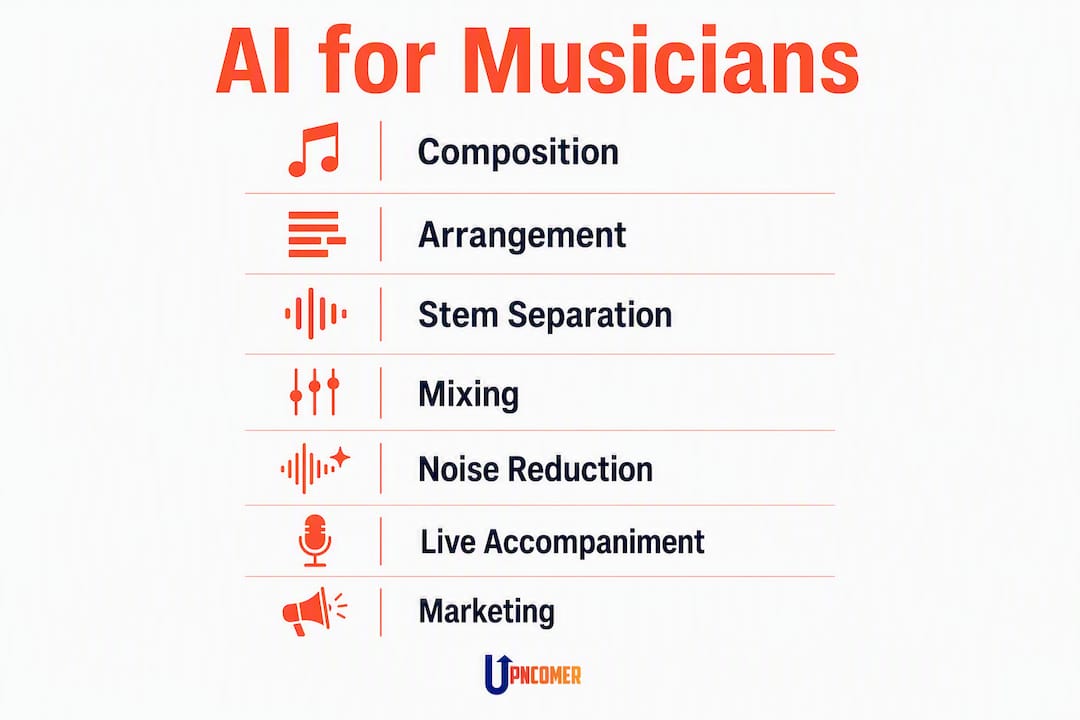
Mixing and mastering. AI mastering services analyze your mix and apply loudness normalization, EQ, and compression automatically. Upncomer’s UrStudio module covers AI-assisted mastering and explains when a human engineer is still the better call.
Noise reduction and audio restoration. Useful for cleaning up home recordings or salvaging live takes with background noise.
Practice and live accompaniment. AI can listen to a human performer and accompany in real time — a capability Wikipedia’s entry on artificial intelligence in music traces back to early computer accompaniment research, now available in consumer tools.
Metadata, release copy, and marketing content. AI drafts bio copy, playlist pitch notes, social captions, and press releases. Typical outputs: MIDI files, WAV stems, dry or mastered audio, and DAW session exports.
How to stitch AI into songwriting, production, and promotion
Three workflows cover most of what independent artists need day-to-day.
Songwriting sketch to demo
Generate a MIDI sketch using a layered prompt (genre, tempo, instrumentation, mood). Import into your DAW, edit the melody and chord voicings, record your vocal or lead instrument over it, then export stems. The AI gave you a scaffold; you built the house.
Production and mix-revision loop
Run your rough mix through an AI mastering service to hear a reference loudness target. Use that as a diagnostic: if the AI master sounds thin, your mix has a low-mid problem. Fix the mix, re-export, repeat. This loop is faster than booking studio time for every revision.
Release promotion and analytics-driven marketing
Once your track is distributed, pull streaming and audience data into your analytics workflow. Upncomer’s music production analytics guide explains how listening metrics help you decide which stems to pitch, which versions to boost, and when to run ad spend. The Content Creator module drafts social assets; the Publicist module handles playlist pitch copy.

Pro Tip: When prompting AI for music, layer your descriptors rather than using a single emotion word. “Lo-fi hip-hop, 85 BPM, Rhodes piano, muted trumpet, late-night melancholy” yields a usable MIDI sketch. “Sad” yields noise. The more specific your input, the less editing you’ll do on the output.
Ethics, copyright, and licensing: what U.S. musicians must check
This is where most artists skip steps and pay for it later. Before you publish or monetize any AI-assisted work, run through this checklist:
- Commercial-use license: Does the tool’s TOS explicitly grant you commercial rights to the output? Many free tiers do not.
- Ownership of masters and compositions: Who owns the generated audio? Some platforms retain a license to use your outputs for training or promotion.
- Training data opt-in: Was the model trained on copyrighted music without artist consent? Opt-in policies are the ethical standard; opt-out or silence is a red flag.
- Dataset rights: Does the provider claim rights to audio you upload? Uploading an unreleased master to a tool that retains dataset rights is a real risk.
- Derivative work and sample clearance: If the AI output sounds substantially similar to a known work, you carry the clearance burden under U.S. copyright law.
- Registration: Register your AI-assisted compositions and sound recordings with the U.S. Copyright Office. The human-authored elements are protectable; document your creative contributions clearly.
In U.S. music contracts, the master recording and the underlying composition are treated as separate assets. An AI tool that grants you rights to the audio file (master) may say nothing about the composition copyright — especially if the model generated a melody. Read both sections of any TOS.
Pro Tip: Embed your metadata before you distribute. ISRC codes, songwriter credits, and publisher information should be baked into the file, not added later. AI tools that strip or ignore metadata can create rights gaps that cost you royalties downstream. Check out this music licensing guide for a deeper look at sync and commercial licensing practicalities.
This article is general information, not legal advice. Confirm current copyright rules with a qualified music attorney or the U.S. Copyright Office.
How to pick an AI tool: the checklist that actually matters
Use these seven dimensions to evaluate any tool in a 10–15 minute trial session. A practical independent artist guide from Upncomer walks through tool selection in more detail.
- Output ownership and licensing. Can you sell, sync-license, or stream the output commercially? Look for explicit language — “you own all outputs” is the standard to seek.
- Export formats. Does it export MIDI, WAV stems, or full mixes? A tool that only exports a mixed-down MP3 limits your production flexibility significantly.
- DAW and workflow integration. Does it work as a plugin (VST/AU), or is it web-only? Web-only tools add friction; plugin integration keeps you in your session.
- Pricing model and limits. Free tiers often cap exports or watermark audio. Subscription tiers typically run $10–$30/month for prosumer tools; enterprise or credit-based models suit occasional use better.
- Model transparency and training data opt-in. Does the company publish information about what music trained the model? Opt-in consent from artists is the ethical benchmark.
- Real-time latency. For live performance or accompaniment use, latency under 10ms is the practical threshold. Test this in your DAW before committing.
- Mastering and audio quality. Run a known reference track through the mastering module and compare the output to a professionally mastered version. Trust your ears over marketing copy.
What AI won’t do: the limits you need to know
SAE Institute’s analysis is direct: AI improves technical efficiency in noise reduction, arrangement generation, and mixing assistance, but it lacks human intuition and emotional nuance. Here’s what that looks like in practice:
- Emotional intent. AI generates plausible patterns; it does not feel the tension in a pre-chorus or know why a specific chord inversion hits differently at 2 AM. That’s yours.
- Genre nuance. Models trained on broad datasets often flatten genre-specific micro-details — the swing in a New Orleans second-line, the specific reverb decay of 1970s dub. You’ll need to correct these.
- Lyric quality. AI lyrics tend toward cliché and generic phrasing. Use them as a first draft to break writer’s block, not as finished copy.
- Legal clarity. No AI tool can guarantee its output is free of copyright issues. That responsibility stays with you.
- Metadata accuracy. AI can hallucinate credits, BPM values, or key signatures. Always verify.
The skills worth sharpening alongside AI adoption: curation judgment, prompt craft, final mix taste, legal literacy, and audience-facing storytelling. Use AI for ideation and technical iteration. Keep the vocal performance, the final arrangement call, and the emotional arc entirely human.
How Upncomer maps AI into your artist workflow
Upncomer functions as an integrated operating system for independent artists, so each module connects to a specific workflow stage rather than sitting in isolation.
| Module | Musician task | Typical output |
|---|---|---|
| Amplitude AI | Ad targeting, campaign budgeting, audience insights | Optimized ad sets, audience segments |
| UrStudio | AI-assisted mastering, stem handling | Mastered WAV, separated stems |
| Growth Engine | Release promotion, playlist pitching | Pitch copy, campaign performance data |
| Distribution | Rights management, royalty tracking | Distributed releases, royalty reports |
| Content Creator | Social assets, caption drafting | Platform-ready posts, short-form video copy |
| Data Analyst | Streaming analytics, engagement tracking | Dashboard reports, A/B test results |
| Artist Manager | Workflow coordination, release planning | Release timelines, task tracking |
| Publicist | Press outreach, playlist pitch automation | Press releases, pitch emails |
| ProfessorU | Music business education, skill development | Courses, frameworks, industry guides |
Amplitude AI sits at the center of the marketing and analytics loop: it suggests budgeted ad audiences based on your streaming data and helps you allocate spend across platforms. UrStudio handles the audio side, with AI-assisted mastering that covers file preparation, sonic tradeoffs, and commercial-use implications for your masters. The music analytics guide from Upncomer shows how the Data Analyst module connects streaming data to promotion decisions.
Pro Tip: The fastest path to a first AI-assisted demo inside Upncomer is a single-song pilot: generate a MIDI sketch externally, import stems into UrStudio for an AI master, then push the release through Distribution. That loop validates your file formats and licensing setup before you commit a full project to the workflow.
Data privacy and security when using AI music tools
Unreleased music is your most sensitive asset. Before uploading any project file to an AI tool, check three things: where the data is stored (on-device vs. cloud), how long the provider retains your uploads, and whether your audio can be used to retrain the model.
Cloud-based tools are convenient but carry real exposure. If a provider’s TOS says they may use uploaded content for “service improvement,” that language often covers model training. For unreleased masters, prefer tools with explicit no-training clauses or on-device processing options.
Practical steps to protect your project data:
- Use a dedicated account (separate from your personal email) for AI tool trials.
- Never upload a full unreleased master to a tool you haven’t vetted. Upload a rough mix or a stem instead.
- Check the provider’s data retention policy — some platforms delete uploads within 24 hours; others keep them indefinitely.
- Enable two-factor authentication on any platform that stores your audio files.
- For collaborative projects, agree on which tools the team will use before anyone uploads shared stems.
The AI4Musicians project and related academic research (including NSF-funded work) are actively developing frameworks for ethical data use in music AI — worth following as industry standards evolve.
Key Takeaways
AI speeds your workflow and automates routine production tasks, but output ownership, training data transparency, and human curation determine whether it actually serves your career.
| Point | Details |
|---|---|
| AI augments, not replaces | Use AI for prototyping and iteration; keep emotional intent, final mix decisions, and storytelling human. |
| Verify commercial rights first | Check TOS for explicit commercial-use language before publishing or monetizing any AI-assisted work. |
| Layer your prompts | Specific descriptors (genre, tempo, instrumentation, vocal timbre) yield usable outputs; vague prompts waste time. |
| Protect unreleased audio | Never upload an unvetted master to a cloud AI tool; check data retention and no-training clauses first. |
| Upncomer integrates the full loop | Amplitude AI, UrStudio, Growth Engine, and Distribution connect ideation through release in one platform, keeping rights and monetization in your hands. |
The honest case for AI adoption
There’s a version of the AI conversation that treats every new tool as either a threat or a miracle. Neither framing helps you make a record or grow a fanbase.
What actually matters is simpler: AI compresses the time between an idea and a listenable demo. That compression is genuinely useful for independent artists who don’t have a full production team. The risk isn’t that AI will replace your creativity — it’s that you’ll skip the curation step, publish something that sounds like everyone else’s AI output, and wonder why it didn’t connect.
The artists who get the most from these tools treat AI the way a session musician treats a drum machine: a useful collaborator with specific strengths, not a substitute for musical judgment. The curation layer — choosing which generated idea to develop, which mix to push, which lyric to rewrite — is where your identity as an artist lives. That part doesn’t get automated.
Upncomer gives you an integrated AI workflow, not another disconnected tool
Most AI tools solve one problem and leave you to figure out the rest. Upncomer is built differently: it connects the AI-assisted creative work (mastering in UrStudio, content drafting in Content Creator) to the business side (distribution rights, streaming analytics in Data Analyst, ad targeting in Amplitude AI) inside one platform designed for independent artists.

That means you’re not exporting a master from one tool, uploading it to a second for distribution, and manually pulling analytics from a third. The workflow stays connected, and your rights and royalty data stay visible throughout. Upncomer’s distribution page shows how the platform handles rights management and royalty tracking alongside the AI tools. Ready to run your first AI-assisted release? Start with Upncomer and map a single song through the full workflow.
Further reading and authoritative sources
- How Musicians Can (and Should) Use AI — Berklee — Faculty panel advice on prototyping, curation, and skill development alongside AI tools.
- AI Music: What Musicians Need to Know — Berklee — Broad overview of AI capabilities across songwriting, production, and promotion.
- The Future of AI in Audio Production — SAE Institute — Industry commentary on efficiency gains, emotional limits, and the human-AI balance in audio production.
- AI in Music Production — Musicians Institute — Practical framing of AI as a creativity amplifier, with examples of AI-generated demos refined by human artists.
- AI4Musicians (AIM) Project — Academic research initiative developing ethical frameworks and tools for musicians working with AI.
- Music Industry AI: A Practical Guide — Upncomer — Hands-on tool selection and workflow walkthroughs for independent artists.
- What Is AI Mastering Audio? — Upncomer — File prep, sonic tradeoffs, and when to choose human mastering over AI.
- Music Licensing for Film and TV — InDepthJayBeats — Sync licensing and commercial clearance guide for independent artists.
FAQ
What does AI actually do for independent musicians?
AI generates MIDI sketches, arrangements, stems, mastered audio, and promotional copy from text or audio prompts. It works best as a prototyping engine — fast iteration, then human curation.
Do I own the music AI tools generate for me?
Ownership depends entirely on the tool’s terms of service. Many free or low-cost tools reserve training or dataset rights; Berklee advises verifying explicit commercial-use rights before publishing or monetizing any AI-assisted work.
How does Upncomer use AI in its platform?
Upncomer’s Amplitude AI module guides ad targeting and audience insights; UrStudio handles AI-assisted mastering and stem management; the Growth Engine and Distribution modules connect release promotion to rights tracking and royalty reporting.
Is AI-generated music protected by U.S. copyright?
Human-authored elements in an AI-assisted work are protectable under U.S. copyright law. Purely AI-generated content with no human creative input currently lacks copyright protection. Document your creative contributions and register works with the U.S. Copyright Office.
How do I protect unreleased music when using AI tools?
Upload rough mixes or stems rather than full masters, check the provider’s data retention and no-training clauses, and use a dedicated account for AI tool trials. Never upload an unreleased master to a platform whose TOS you haven’t read.