Music Industry AI: A Practical Guide for Independent Artists

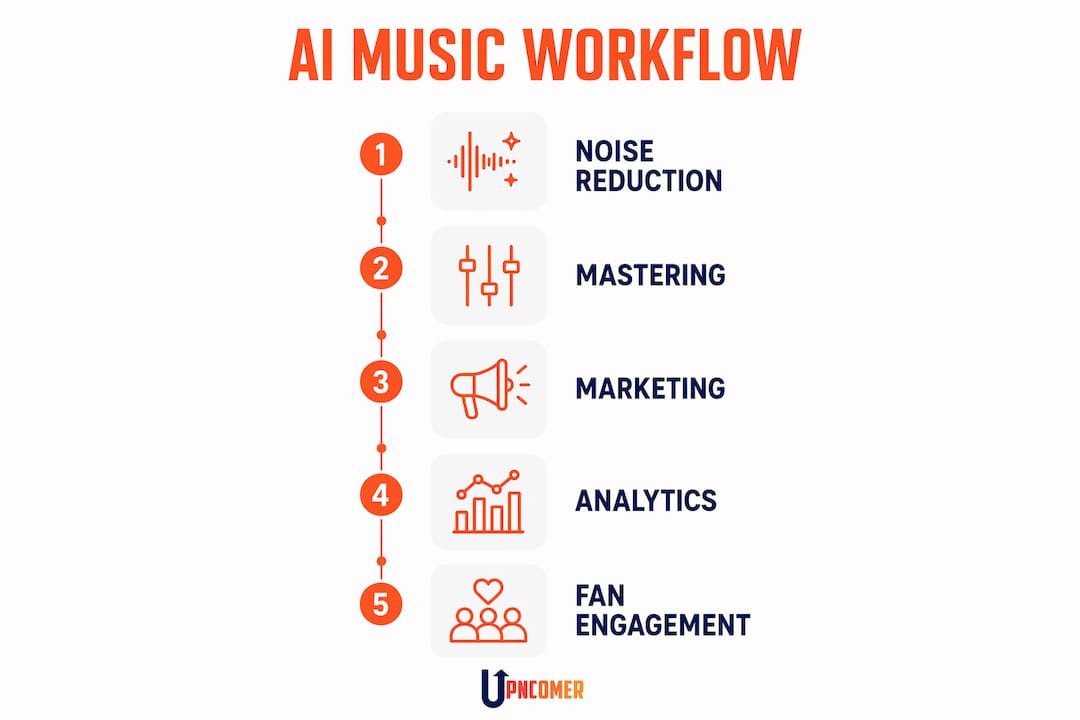
AI is the most practical studio-and-team extension available to independent musicians right now. It speeds up production polish, scales your marketing, and surfaces audience insights you’d otherwise miss — all while keeping your creative decisions exactly where they belong: with you. The smartest first move? Pick one song, run it through AI-assisted cleanup, do a human mix pass, then test a targeted ad. One experiment. Real data.
Here’s what that looks like in practice:
- Production wins: noise reduction on bedroom recordings, stem separation for remixes, AI-assisted mastering without a $300 engineer session
- Composition speed: MIDI sketch generation, arrangement suggestions, lyric variants to break writer’s block
- Marketing automation: ad creative testing, social content scheduling, smart links, automated playlist pitching
- Analytics clarity: streaming performance dashboards, audience segmentation, playlist-pitch signals
Scale check: ~90,000 AI-generated tracks were flooding Deezer daily as of mid-2026, passing half of all new uploads. The opportunity is real. So is the noise. Quality and intention are what separate you from the flood.
The TL;DR next step: run that one-song experiment inside a single platform or DAW-integrated workflow. Upncomer is built for exactly that.
Table of Contents
- What can AI actually do for your music career today?
- How to integrate AI into your creative and release workflow
- What are the legal and ethical risks for U.S.-based artists?
- How do you evaluate AI music tools before committing?
- How Upncomer maps to the studio-as-extension workflow
- Your 30-day AI adoption plan
- Key Takeaways
- The honest truth about AI and creative control
- Upncomer gives you one place to run all of it
- Useful sources and next reads
- FAQ
What can AI actually do for your music career today?
Artificial intelligence in music has moved well past MIDI-only generation. Today’s tools handle high-fidelity audio production including arrangement, rhythm, and lyrics, which means the gap between a bedroom demo and a release-ready file is smaller than it’s ever been.
Production is where AI earns its keep fastest. Noise reduction cleans up room tone on a vocal recorded in your closet. Stem separation lets you pull a vocal or guitar track from a mixed file for remixing or sampling. Mix assistants suggest EQ and compression moves based on genre references. AI mastering tools deliver a distribution-ready master in minutes. As SAE’s production researchers note, producers’ roles are shifting toward curating and refining AI outputs rather than fully automating creative choices.
Composition is more nuanced. AI is great for rapid idea prototyping: generate a chord progression, sketch an arrangement, get five lyric variations on a hook. What it cannot do is make the taste call. That’s still yours.
Marketing and operations are where AI arguably saves the most time for a solo artist. CRM automation keeps your fan list warm without manual emails. Social content generators draft captions and short video scripts. Ad creative testing runs multiple versions of a campaign simultaneously. Automated pitching workflows submit your track to playlist curators while you’re in the studio.
“Fans want to know whether and how generative AI has been used in the music to which they listen. Given how important human artistry and authenticity is to music lovers all over the world, these labels will provide an immediately understandable and easily scalable approach to transparency.” — IFPI CEO Vikki Oakley and RIAA Chairman Mitch Glazier, joint statement on AI labeling
Analytics and discovery close the loop. Streaming analytics tell you which cities are listening, which playlists are driving streams, and which audience segments are most engaged. That data feeds smarter playlist pitching and more targeted ad spend.

How to integrate AI into your creative and release workflow
The studio-as-extension approach, recommended by Berklee experts, keeps human taste as the deciding filter at every stage. AI accelerates; you decide.
- Set a clear objective first. Are you polishing a track, prototyping a new idea, or building marketing assets? State the outcome before you open any tool.
- Prep your stems. Export clean, labeled stems from your DAW before feeding anything to an AI tool. Audio-based conditioning on stems gives you far more control than working with a bounced mix.
- Run the AI assist. Apply noise reduction, stem separation, or a mix draft. For composition, generate MIDI sketches or lyric variants as raw material, not finished product.
- Do the human creative pass. Listen critically. Accept what serves the song. Reject what doesn’t. This is the step most artists skip when they’re excited about a new tool, and it’s the most important one.
- Quality control checkpoint. Compare the AI-assisted version against your original. Check for over-processing artifacts, unintended pitch correction, or tonal shifts. Keep versioned project files so you can roll back.
- Build release and marketing assets. Once the track is locked, use AI content tools to generate social captions, short video clips, and ad creatives from your stems and artwork.
- Measure and iterate. Track engagement, CTR, and stream gains against your baseline. Document what worked.
Pro Tip: When using stem separation, always A/B the separated stem against the original mix at the same gain level. Phase artifacts are easy to miss at low volumes and can degrade the final master.
What are the legal and ethical risks for U.S.-based artists?
Rights and licensing are the first thing to check, not the last. Before you release anything commercially, read the IP section of every tool’s terms of service. Some platforms claim a license to your uploads or require a paid tier to retain full commercial rights. AIVA, for example, requires its Pro Plan for full copyright ownership of generated compositions.
Transparency is now an industry standard. In July 2026, RIAA, IFPI, the Grammys, SAG-AFTRA, and A2IM launched a unified AI labeling program distinguishing “AI-Generated” from “AI-Assisted” tracks. Applying the correct label in your metadata and liner notes isn’t just good ethics. It’s becoming the industry baseline.
Apple Music has reported that more than one-third of tracks uploaded to its platform are “100% AI,” while Deezer noted AI-generated tracks comprised 44% of all new music delivered to its platform. Bulk, low-quality uploads can trigger distributor anti-fraud systems and damage your long-term discoverability.
U.S. compliance checklist:
- Read your distributor’s IP and AI policy before uploading
- Apply the correct AI-Generated or AI-Assisted label in your metadata
- Check whether your tool’s terms allow training data opt-out
- Verify metadata accuracy: ISRC, songwriter credits, and publishing splits
- For sample-heavy or voice-cloning projects, consult a music/IP attorney
Scholars studying AI and fan relationships note that transparent AI use builds more trust than concealment. Your fans will respect the honesty.
How do you evaluate AI music tools before committing?
Not every tool that says “AI” is worth your time or money. Here’s what actually matters:
- Audio quality: Does the output hold up at full volume on reference headphones? Artifacts and smearing are dealbreakers.
- DAW and plugin integration: VST, AU, or standalone? Can it fit inside your existing session, or does it require a separate export/import step?
- Stem support and export fidelity: Can you feed it individual stems? Does it export at 24-bit/48kHz or higher?
- Human-in-the-loop controls: Can you adjust, reject, or iterate on outputs, or is it a one-shot black box?
- IP and ownership terms: Who owns the output? Are there commercial release restrictions on the free tier?
- Training data transparency: Does the tool disclose what it was trained on? Can you opt your uploads out of future training?
- Trial tasks to run: Feed the same vocal stem through two different mastering tools and compare. Run the same lyric prompt through two composition tools. The difference in output quality is immediately obvious.
Validation criteria from ISMIR research confirm that DAW integration, stem conditioning, version control, export fidelity, and transparent IP terms are the factors that determine real production utility. Cost and interface come after those.
How Upncomer maps to the studio-as-extension workflow
Upncomer is built as a unified AI operating system for independent artists, which means you’re not stitching together five separate tools to cover production, marketing, analytics, and distribution.
“Instead of juggling separate platforms for marketing, analytics, fan engagement, mastering, content creation, distribution, playlist pitching, and campaign management, artists can manage everything inside one unified ecosystem.” — Upncomer
Here’s how the modules map to the workflow above:
- UrStudio handles AI-assisted mastering and audio asset management, the production end of the studio-as-extension approach
- Amplitude AI and Data Analyst cover streaming analytics and audience segmentation, so your release decisions are backed by real data
- Growth Engine runs ad campaign automation and creative testing, the marketing layer that most solo artists skip because it feels too complex
- Artist Manager and Publicist handle pitching workflows and release coordination, automating the admin that eats your studio time
- Content Creator generates social assets from your music and artwork, and ProfessorU gives you the skill-building resources to use every tool well
A single platform means unified metadata, one project workspace, and no data lost between tools. That’s a real operational advantage when you’re managing a release solo.
Your 30-day AI adoption plan
| Week | Focus | Key Tasks | Success Signal |
|---|---|---|---|
| Week 1 | Goal-setting and setup | Pick one track, record baseline stream and engagement metrics, set up accounts, upload clean stems | Baseline documented, stems organized |
| Week 2 | Production experiments | Noise reduction, stem separation, AI mix draft, human pass and selection | Release-ready file with no artifacts |
| Week 3 | Marketing assets and ad test | AI-generated social captions and short video clips, one A/B ad test, analytics dashboard live | CTR data from at least two ad variants |
| Week 4 | Release prep and review | Metadata check, distributor AI policy confirmed, labels applied, results vs. baseline evaluated | Documented learnings, decision on next experiment |
Keep the scope tight. One track, one campaign, one month. Mass-upload behavior can trigger distributor fraud flags and hurt your analytics trustworthiness. Measured experiments protect your reach while you learn what actually works for your sound and audience.
Key Takeaways
AI works best as a studio-and-team extension that speeds production tasks and surfaces audience insights, with human taste as the deciding filter at every step.
| Point | Details |
|---|---|
| AI as extension, not replacement | Use AI for noise reduction, mastering, ad testing, and analytics while keeping creative decisions yours. |
| Run one disciplined experiment | A 30-day, one-track experiment gives you real data without risking your distribution standing. |
| Check IP terms before release | Read every tool’s ownership clause; some require paid tiers to retain full commercial rights. |
| Apply AI labels to your metadata | The RIAA/IFPI “AI-Assisted” or “AI-Generated” label is now the U.S. industry standard for transparency. |
| Upncomer unifies the workflow | Upncomer maps UrStudio, Amplitude AI, Growth Engine, and Distribution into one platform for indie artists. |
The honest truth about AI and creative control
The artists who get the most out of AI tools are the ones who already know what they want. That’s not a paradox. It’s the whole point. When you have a clear sonic vision, AI becomes a fast lane: you get to the idea quicker, test more variations, and spend less time on technical grunt work. When you don’t have that vision, AI just generates more options you can’t evaluate.
The Berklee guidance on skill-building isn’t a warning against AI. It’s a reminder that taste is the skill. Artists who combine genuine craft with AI tools maintain distinct artistic signatures. Those who skip the craft and lean entirely on generation tend to produce work that sounds like everything else. The 90,000 daily AI uploads flooding streaming platforms are proof of what happens when the tool runs without a human filter.
Use AI to move faster. Keep your ear as the final judge. That combination is what actually builds a career.
Upncomer gives you one place to run all of it
Most independent artists lose time not because they lack talent, but because they’re managing five different tools that don’t talk to each other. Upncomer changes that. It’s a unified AI operating system where your music distribution, ad campaigns, streaming analytics, AI mastering, and fan engagement all live in one place, designed specifically for artists who want major-label infrastructure without the label.

The Growth Engine handles your ad automation. UrStudio handles your masters. Amplitude AI reads your audience data and tells you what to do next. You stay focused on the music. Check out the latest platform updates and start your trial at Upncomer.
Useful sources and next reads
- How Musicians Can (and Should) Use AI — Berklee: Ethics, pedagogy, and the studio-as-extension framework from music educators
- On the Development and Practice of AI Technology for Contemporary Popular Music Production — TISMIR: Technical validation criteria for studio AI tools, including DAW integration and stem conditioning
- Artificial Intelligence and Musicking — Music Perception / UC Press: Academic analysis of AI’s impact on artist-fan relationships, CRM, and transparency ethics
- 90,000 AI Tracks Flood Deezer Daily — Music Business Worldwide: Industry-scale data on AI upload volumes and platform detection responses
- Music Community Introduces New AI Labeling Program — RIAA: Official U.S. industry standard for AI-Generated and AI-Assisted track labeling
- Artificial Intelligence in Music — Wikipedia: Overview of AI capability development from MIDI generation to high-fidelity audio
FAQ
What does “music industry AI” mean for independent artists?
It means AI tools that handle production tasks (noise reduction, mastering, mixing), composition prototyping, marketing automation, and streaming analytics, so solo artists can access capabilities previously reserved for label-backed teams.
Is AI-generated music legal to distribute in the United States?
Generally yes, but ownership depends on the tool’s terms of service. Some platforms require a paid tier for full commercial rights. The RIAA and IFPI now require “AI-Generated” or “AI-Assisted” labeling in track metadata for transparency.
Will AI uploads hurt my streaming reach?
Bulk, low-quality AI uploads can trigger distributor anti-fraud systems and reduce discoverability. Measured, quality-focused releases protect your reach and keep your analytics trustworthy.
How does Upncomer help with AI music workflows?
Upncomer combines UrStudio for AI mastering, Amplitude AI and Data Analyst for streaming analytics, Growth Engine for ad automation, and Distribution into one platform, so independent artists can run end-to-end AI-assisted workflows without switching tools.
Do I need to disclose AI use to my fans?
The RIAA, IFPI, Grammys, and SAG-AFTRA launched a unified labeling program in 2026 making “AI-Assisted” and “AI-Generated” labels the U.S. industry standard. Transparent disclosure builds fan trust and is increasingly expected across major streaming platforms.