Save Royalties in First 48 Hours: ISRC vs UPC for Independent Artists
An ISRC identifies a specific recording. A UPC identifies a specific release. You need both correctly assigned before you distribute music, because one tracks royalties down to the recording and the other tracks sales and chart data at the product level. Get them mixed up and streaming platforms can reject your delivery or scramble your reporting.
TL;DR:
- Releasing new versions of a recording requires a new ISRC, even for slight edits, but reusing an ISRC is acceptable only if the master remains unchanged.
- A single release needs only one UPC, which should be used for the entire product unless its format or contents change significantly, such as added or removed tracks.
- Distributors typically generate free ISRCs automatically, but artists can register and assign their own codes through the International ISRC Agency for greater control.
- Mistakes like swapping ISRC and UPC fields during upload are common causes of rejection or metadata fragmentation, emphasizing the need for careful validation.
- Using integrated distribution tools that automate validation prevents errors, reduces rejection risk, and consolidates reporting, especially useful during early post-release stages.
Table of Contents
- ISRC Explained: Structure, Permanence, and Use Cases
- UPC Explained: Format, Issuer, and Why Every Release Needs One
- ISRC vs UPC at a Glance
- When to Reuse Codes vs When to Issue New Ones
- Common Mistakes That Fragment Your Metadata
- Why Integrated Tools Cut Down on Metadata Errors
- Let UpNComer Handle Your Code Assignment and Validation
- Sources
- FAQ
ISRC Explained: Structure, Permanence, and Use Cases
An International Standard Recording Code, or ISRC, is a permanent fingerprint for one specific recording. It never changes once assigned, even if you re-release the track, change distributors, or license it somewhere new. That permanence is the whole point: it’s how royalties follow the exact recording, not just the song title.
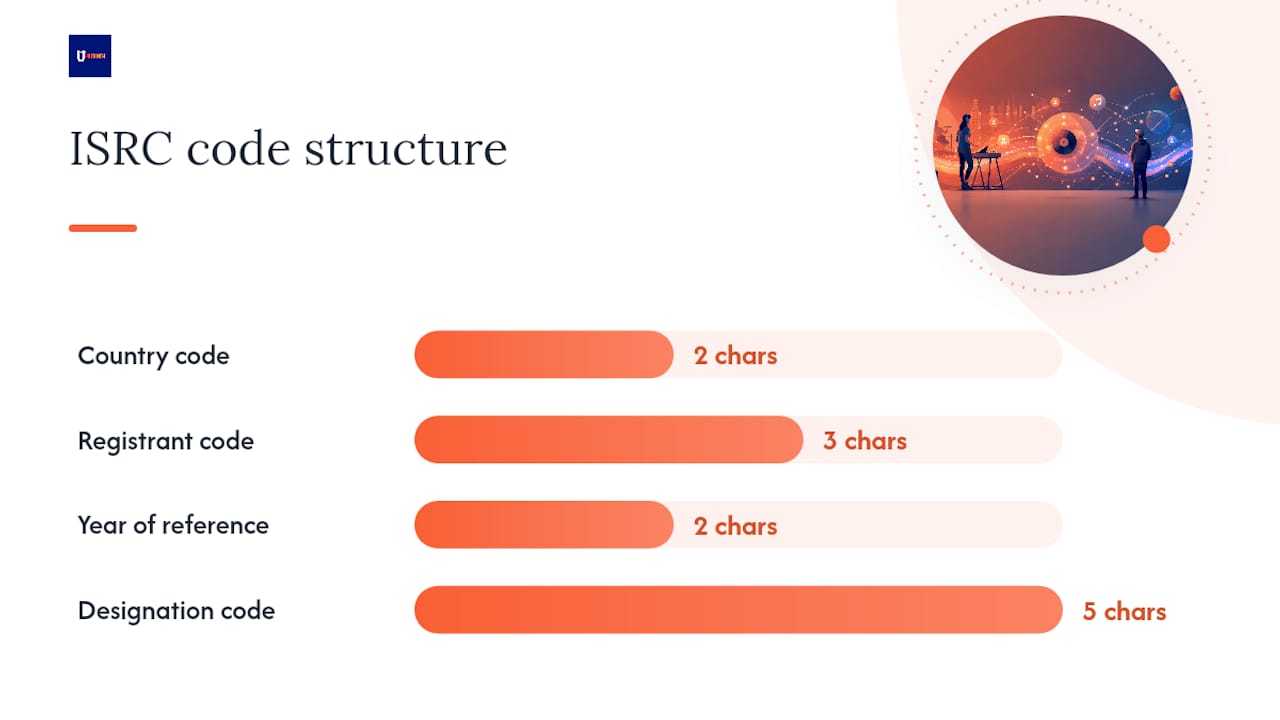
Every ISRC follows the same structure, laid out by the International ISRC Agency: a two-letter country code, a three-character registrant code, a two-digit year of reference, and a five-digit designation code unique to that recording. So “USRC17607839” tells you the country, the registrant, the year it was registered, and which recording it is.
Where the code comes from matters. You can get ISRCs three ways:
- Through your distributor. Most auto-generate them for free when you upload a track.
- Through a registrant prefix. You register once with a national agency and assign your own codes going forward, useful if you’re releasing constantly.
- Directly through the International ISRC Agency, which also explains registrant rules in detail.
The rule that trips people up: a new version needs a new ISRC. A remix, an edit, an acoustic version, even a live take that’s meaningfully different from the studio version, all get their own code. The original master keeps the one it already has, forever.
UPC Explained: Format, Issuer, and Why Every Release Needs One
A Universal Product Code, or UPC, identifies your release as a sellable product, the way a barcode identifies a can of soup on a shelf. Streaming platforms adopted the same system retailers use, which is why your single, EP, or album needs one before it can go live.
Most releases use UPC-A, a 12-digit number. Some regions and some distributors instead issue EAN-13, a 13-digit variant that’s functionally the same thing with one extra digit. GS1 is the global organization that owns and issues these standards, and platforms generally treat UPC-A and EAN-13 interchangeably at the point of ingestion.
The rule here is simpler than the ISRC rule: one release gets one UPC, no matter how many tracks are inside it. A 12 track album is still a single product with a single code.
- You only need a new UPC if the product itself changes: a deluxe edition with added tracks, a reissue with a different tracklist, or a repackaged version sold separately.
- Getting a UPC directly from GS1 means you own the prefix and can issue your own codes indefinitely, which suits a label putting out many releases.
- Getting a UPC through your distributor is faster and usually free, which is the more practical route for most independent artists.
ISRC vs UPC at a Glance
The fastest way to tell them apart visually: ISRCs start with letters, UPCs are all numbers. Here’s how the two stack up side by side.
| ISRC | UPC | |
|---|---|---|
| Identifies | A specific recording | A specific release (product) |
| Format | Alphanumeric (e.g., USRC17607839) | Numeric, 12 or 13 digits |
| Issued by | Distributor, registrant, or the International ISRC Agency | Distributor or GS1 |
| Quantity needed | One per recording/version | One per release, regardless of track count |
| Primary use | Royalty tracking, streaming attribution | Sales reporting, chart eligibility, store listings |
| Failure mode | Split royalties, duplicate detection issues | Rejected delivery, broken sales history |
A 10 track album needs exactly one UPC and ten distinct ISRCs, one per song. Mix those roles up in your metadata and a distributor’s validation system will likely flag or reject the delivery outright.
When to Reuse Codes vs When to Issue New Ones
The decision rule is simpler than most artists assume: reuse an ISRC only if the master file is bit-for-bit identical to what you already released. Same mix, same master, same length. If you touched the mix at all, even a minor loudness adjustment some engineers argue shouldn’t count, the safer move is a new code.
A new UPC only becomes necessary when the product itself changes shape: you add bonus tracks, drop a track, or release a “deluxe” version alongside the original. Updating cover art or fixing a typo in the artist name doesn’t require a new UPC.
If you’re migrating an existing catalog to a new distributor, follow this order:
- Pull your existing ISRCs and UPCs from your old distributor’s export or reporting dashboard.
- Enter those exact codes into the new distributor’s system rather than letting it auto-generate fresh ones.
- Confirm the master audio files are unchanged before uploading.
- Check that each track’s ISRC field and the release’s UPC field aren’t swapped.
- Submit a test delivery if your distributor offers one, and review it before the release goes live.
Pro Tip: Keep a simple spreadsheet with every ISRC and UPC you’ve ever assigned, tied to the release date and distributor. It takes ten minutes to set up and saves hours the first time you switch platforms.
Common Mistakes That Fragment Your Metadata
The single most damaging error is swapping the ISRC and UPC fields during upload, something that happens more often than you’d expect when artists fill out distributor forms manually. Because DDEX delivery standards require both fields validated correctly, a swap can trigger a rejected delivery or, worse, a delivery that goes through with corrupted metadata.
Other recurring problems: assigning a brand new ISRC to a track that hasn’t actually changed (which splits your royalty history across two codes instead of one), duplicating a UPC across two different releases, and typos in either code that pass a casual glance but fail automated validation.
- Freeze your master files before assigning any codes, so nothing shifts after the fact.
- Run a test delivery through your distributor’s sandbox environment if one is available.
- Centralize all metadata, codes included, in one document your whole team can reference.
- Double check that ISRCs start with letters and UPCs are purely numeric before submission.
Pro Tip: If you’re a two-person team, assign one person as the sole “keeper” of the metadata spreadsheet. Split ownership across band members is where duplicate codes and swapped fields usually creep in.
Why Integrated Tools Cut Down on Metadata Errors
Most of the mistakes above happen because metadata lives in five different places: a spreadsheet, a distributor dashboard, an email thread, and whatever the mastering engineer sent over. When distribution, validation, and analytics sit in one system, there’s one source of truth instead of five.
That’s the logic behind how UpNComer’s Distribution module handles code assignment. It validates ISRC and UPC formatting automatically before delivery, which catches swapped fields before a DSP does. Paired with Data Analyst for post-release reporting and Amplitude AI for surfacing delivery issues early, the workflow becomes assign, validate, deliver, monitor, rather than assign and hope.
Let UpNComer Handle Your Code Assignment and Validation
If you’ve made it this far, you already know how much can go wrong between a spreadsheet and a live release: swapped fields, duplicate codes, a rejected delivery three days before your release date. UpNComer removes that friction by generating and validating ISRCs and UPCs automatically inside its Distribution module, so the formatting checks that would normally catch a mistake after submission catch it before you ever hit send.

Because Distribution sits alongside Data Analyst and Amplitude AI in the same platform, you’re not exporting reports from one tool and reading them in another. You see delivery status, streaming performance, and audience data in one place, which matters most in the first 48 hours after a release when catching a metadata error early can save your entire royalty history for that track. Visit the UpNComer platform to see how the distribution workflow fits into the rest of your release process, or check community updates for what’s new on the platform this quarter.
FAQ
Can I use a UPC instead of an ISRC?
No. A UPC identifies the release as a whole and an ISRC identifies each individual recording inside it. Streaming platforms require both, since they serve entirely different tracking functions.
How do I get my song’s ISRC code?
Most distributors generate one automatically and for free when you upload a track. If you want to assign your own, you can register through the International ISRC Agency or apply for a registrant prefix.
How much does an ISRC cost?
Distributor-generated ISRCs are typically included at no extra charge. Assigning codes directly through the International ISRC Agency follows a credit system, with public guidance citing an example rate of £15 plus VAT for 30 credits.
Do I need a separate ISRC for every track?
Yes, every distinct recording, including remixes, edits, and substantially different live versions, needs its own ISRC. A multi-track album needs separate ISRCs for each track but only one UPC for the release itself.
What happens if I accidentally reuse an ISRC on a different recording?
Reusing an ISRC on a different master splits royalty tracking and can trigger duplicate-detection flags at your distributor or a performing rights organization, since the code is meant to point to exactly one recording permanently.