AI Mixing and Mastering: A Practical Guide for Producers

AI mixing and mastering is defined as the use of machine learning algorithms to automate audio production tasks including stem balancing, EQ, compression, and loudness normalization, delivering release-ready tracks in minutes rather than days. Tools like LANDR, Loudly, and Vocuno have made this technology accessible to independent musicians who previously needed expensive studio time or a professional engineer. Assistive AI acts as a force multiplier, letting you focus on the creative work while the technical heavy lifting runs in the background. If you have been sitting on a finished record because the mixing phase feels too slow or too costly, this guide is for you.
How does AI mixing and mastering work in music production?
AI mixing and mastering tools automate entire production cycles including stem balancing, EQ, compression, and final loudness normalization in minutes, replacing workflows that traditionally took days. That shift is significant. What used to require a professional engineer, a calibrated studio, and multiple revision sessions now runs through an algorithm trained on thousands of commercial releases.
Here is what these tools actually handle under the hood:
- Frequency masking resolution. AI identifies where instruments clash in the frequency spectrum and applies corrective EQ automatically.
- Gain staging. The system sets consistent levels across all stems before processing begins, preventing distortion and clipping.
- Stereo width adjustment. Algorithms widen or narrow the stereo image based on genre conventions and the content of your mix.
- Loudness normalization. Tools like Loudly align loudness and true peak levels with platform standards for Spotify, Apple Music, TikTok, and YouTube, preventing distortion and volume inconsistencies.
- Console and genre emulation. Some tools apply tonal coloring modeled after specific analog hardware or genre references to shape the character of the mix.
That last point matters more than most producers realize. Streaming platforms apply their own loudness normalization, which means a track mastered too loud will actually sound quieter and thinner to listeners. AI mastering tools trained on platform standards account for this automatically.
Pro Tip: Before uploading to any AI mastering tool, listen to your reference track on the same speakers you used to mix. If the reference sounds dramatically different from your mix, the AI will have a harder time closing that gap.

What are the best practices for preparing stems before using AI tools?
Garbage in, garbage out. AI mixing tools are powerful, but they cannot fix a poorly prepared session. Getting your stems right before upload is the single biggest factor in the quality of your final result.
Follow these steps before you send anything to an AI mixing or mastering service:
- Export stems with consistent start times. Every stem should begin at bar one, even if the instrument does not enter until later. This keeps everything time-aligned when the AI reassembles the mix.
- Use a uniform sample rate across all files. Mixing sample rates, such as combining 44.1kHz and 48kHz files, introduces conversion artifacts that degrade processing quality.
- Leave headroom on every stem. Upload stems without mix-bus processing and avoid pushing peaks above around minus 6dBFS. The AI needs dynamic range to work with.
- Remove bus processing from individual tracks. Do not print compression or limiting onto your stems. The AI applies its own processing chain, and stacking yours on top creates unpredictable results.
- Label your stems clearly. Name files by instrument and role, such as “kick,” “lead_vox,” and “bass.” Some tools use file names to inform processing decisions.
- Use stem separation if you only have a stereo mix. High-quality stem separation can convert a stereo mix into multitrack stems for re-balancing. The result is less clean than native stems, but it is far better than feeding a flat stereo file to a mixing tool expecting multitracks.
The stem separation point is worth expanding. If you recorded a project years ago and only kept the stereo bounce, tools like Moises or iZotope RX can extract approximate stems. You lose some separation quality, but you regain the ability to adjust levels and processing before the final master. That flexibility is worth the extra step.
How do conversational AI interfaces change the mixing process?
Static presets are the old model. Modern AI audio mixing tools now support conversational interfaces that let you describe what you want in plain language and receive iterative adjustments in return. This changes the relationship between producer and tool from a one-shot upload to an ongoing creative dialogue.
Vocuno is a clear example of this shift. Users can request adjustments like “make it warmer” or “add more reverb” and receive a revised mix without touching a single fader. That kind of language-based control removes the technical barrier for producers who know what they want to hear but do not know which parameter to reach for.
The practical benefits of conversational AI mixing include:
- Iterative refinement. You can describe a problem in plain terms and receive a targeted fix rather than re-uploading and reprocessing from scratch.
- Broad format support. Vocuno supports MP3, WAV, FLAC, M4A, AAC, and OGG, so you are not locked into a specific export format.
- Faster creative decisions. When the technical adjustments happen through language, you spend more time evaluating the sound and less time hunting through menus.
Pro Tip: Treat conversational AI like a session with a real engineer. Be specific. “The snare feels buried in the chorus” gets better results than “fix the drums.” The more context you give, the more targeted the adjustment.
The shift from preset-based to language-based control also lowers the floor for newer producers. You do not need to know what a high-shelf boost at 10kHz sounds like. You just need to know that your mix sounds dull, and the tool handles the rest.
How to integrate multiple AI tools for a professional workflow
Relying on a single AI tool for your entire production chain is the most common mistake producers make when adopting automated music mastering. Combining tools like Claude with dedicated mastering engines outperforms all-in-one generators for arrangement guidance, mix decisions, and final mastering. Each tool does one thing well. Stack them intentionally.
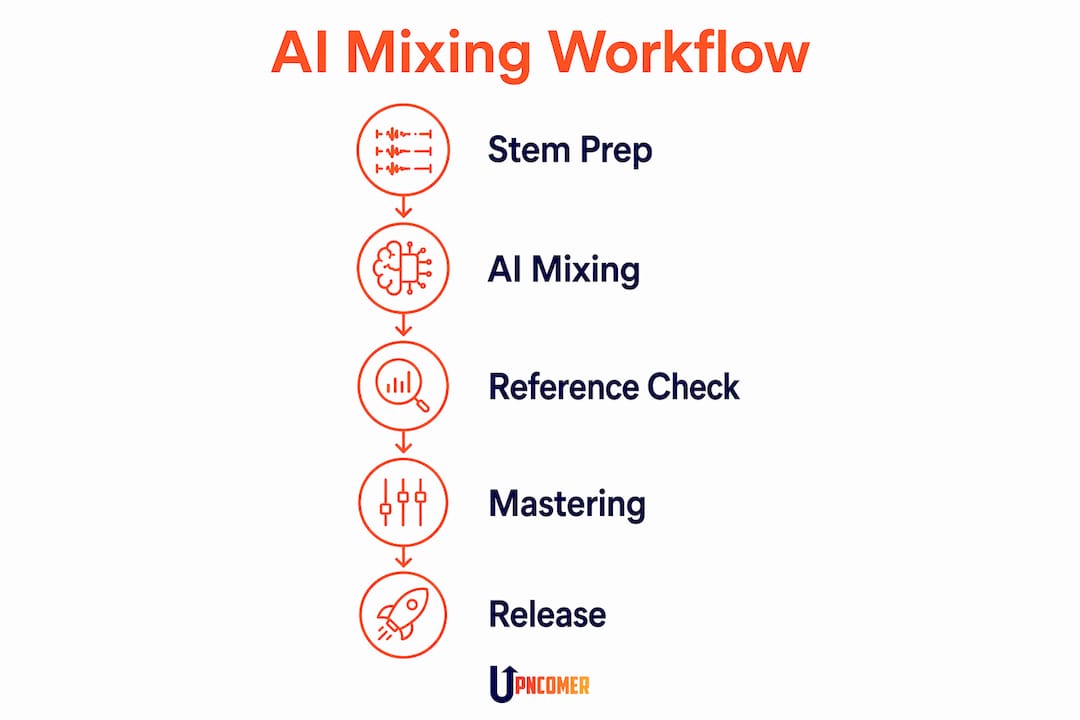
Here is how different AI tools fit into a complete workflow:
| Stage | AI Tool Type | What It Does |
|---|---|---|
| Arrangement and composition | LLMs like Claude | Suggests chord progressions, arrangement edits, and mix notes in plain language |
| Mixing | Dedicated audio AI (e.g., Vocuno) | Balances stems, applies EQ and compression, resolves frequency conflicts |
| Mastering | Specialized mastering engines (e.g., LANDR, Loudly) | Normalizes loudness, applies limiting, matches platform standards |
| Reference analysis | Spectral analysis tools | Compares your master against commercial tracks to diagnose mix issues |
The reference analysis step is where most independent producers leave quality on the table. Spectral analysis against reference tracks helps diagnose mix issues related to streaming platform loudness normalization rather than relying on guesswork. You upload a commercial track in your genre alongside your own, and the tool shows you exactly where your mix diverges in frequency content, dynamic range, and loudness. That data tells you what to fix before you finalize.
Balancing automation with human input is also non-negotiable. AI handles the technical execution. You still make the creative calls: which reference track to use, how much compression feels right for your genre, and whether the AI’s EQ decisions actually serve the song. Combining different AI tools offers more reliable and customizable workflows than chasing a single magic solution. Think of it as building a team, not buying a shortcut.
Key takeaways
AI mixing and mastering delivers professional-quality results fastest when you combine proper stem preparation, conversational AI tools, and a multi-tool workflow rather than relying on any single automated solution.
| Point | Details |
|---|---|
| AI automates core technical tasks | Stem balancing, EQ, compression, and loudness normalization now run in minutes, not days. |
| Stem preparation determines quality | Export stems with headroom, uniform sample rates, and no bus processing before uploading. |
| Conversational interfaces add control | Tools like Vocuno let you describe adjustments in plain language for iterative, targeted results. |
| Stack tools for better outcomes | Combine LLMs for arrangement, dedicated mixers, and mastering engines for a complete chain. |
| Reference analysis closes the gap | Spectral comparison against commercial tracks reveals loudness and frequency issues before release. |
AI tools are a multiplier, not a replacement
I have watched a lot of independent artists adopt AI mixing tools the wrong way. They upload a rough mix, accept the first output, and call it done. The result sounds processed but not polished. The tool did its job. The artist did not do theirs.
The real value of AI in music production is not that it removes the need for good ears. It is that it removes the need for expensive infrastructure. You still need to know what a good mix sounds like. You still need to make creative decisions about tone, space, and dynamics. What AI removes is the bottleneck between your creative vision and a technically competitive result.
There is also a conversation worth having about creative ownership and AI. The electronic music community has been notably quiet about AI adoption, and that silence reflects real anxiety about where the creative credit lives. My view is straightforward: if you wrote the song, arranged the parts, and made the final calls on the mix, the AI was your tool, not your co-writer. Use it accordingly.
The artists I see getting the most out of AI mixing and mastering are the ones treating it as a hybrid workflow. They use AI to handle the technical execution and reserve their own time for the decisions that actually define the record. That balance is where the best results come from. If you want to go deeper on the mastering side specifically, the AI mastering musician’s guide on Upncomer is worth your time.
— Karan
What Upncomer offers independent artists for AI production
Independent artists no longer need a label budget to access professional-grade production tools. Upncomer brings together AI mastering, streaming analytics, release planning, and fan engagement in one place, so you are not stitching together five different platforms for a single release.

Upncomer’s Amplitude AI module gives you data-driven guidance on everything from mix decisions to release timing, while UrStudio supports your content creation workflow around each drop. The distribution tools are built for artists who want their AI-mastered tracks delivered to Spotify, Apple Music, and TikTok with the right loudness standards already baked in. Check the community updates for the latest AI music production resources, tutorials, and platform integrations added for independent artists in 2026.
FAQ
What is AI mixing and mastering?
AI mixing and mastering is the use of machine learning algorithms to automate audio production tasks including EQ, compression, stem balancing, and loudness normalization. These tools deliver release-ready tracks in minutes without requiring a professional engineer.
How do I prepare my stems for AI mixing tools?
Export stems with consistent start times, a uniform sample rate, and no mix-bus processing applied to individual tracks. Leave headroom on every file so the AI has dynamic range to work with.
Can AI mastering tools meet streaming platform loudness standards?
Yes. Tools like Loudly and LANDR align loudness and true peak levels with platform standards for Spotify, Apple Music, TikTok, and YouTube automatically, preventing distortion and volume inconsistencies.
Is one AI tool enough for a complete mix and master?
One tool rarely covers the full chain well. Combining an LLM for arrangement guidance, a dedicated AI mixer, and a specialized mastering engine produces more reliable results than any single automated solution.
Does AI mixing replace a human mix engineer?
AI handles technical execution but does not replace creative decision-making. You still choose the reference tracks, evaluate the output, and make the final calls on tone and dynamics. The AI removes the technical bottleneck, not the need for good ears.