Leave 3–6 dB Headroom: Mixing vs Mastering for Independent Artists
Mixing balances the individual parts inside a song; mastering polishes the finished stereo file for loudness, consistency, and distribution. Mixing shapes vocals, drums, and instruments against each other. Mastering treats the mix as one signal and prepares it for Spotify, Apple Music, and vinyl alike. Mix first, because mastering refines a mix, it doesn’t rescue one that’s fundamentally unbalanced.
TL;DR:
- Proper preparation of tracks, including leaving headroom and avoiding clipping, is essential for effective mastering and prevents additional mix adjustments.
- Mastering adjusts the entire stereo mix with subtle changes, typically between 0.5 and 2 dB, unlike the larger moves made during mixing.
- Fixing structural or balance issues, such as a buried vocal or harsh drums, is a mixing task; mastering cannot reconstruct or rebalance individual elements.
- The sequencing, track order, and metadata are finalized during mastering to ensure a smooth release process and platform compatibility.
- DIY mastering tools help with quick A/B comparisons and slight adjustments but cannot compensate for fundamentally unbalanced or poorly mixed tracks.
Table of Contents
- What Does Mixing Actually Do?
- What Is Mastering, and What Does It Deliver?
- How Are Mixing and Mastering Actually Different?
- How Do Mixing and Mastering Fit Into Your Release Timeline?
- Can Mastering Fix a Bad Mix?
- What Should You Check Before Mastering Your Own Track?
- Why Learning Both Skills Pays Off for Independent Artists
- Get Your Mix Mastered and Distributed Without the Bottleneck
- Where These Facts Come From
- Sources
- FAQ
What Does Mixing Actually Do?
Mixing is where a pile of separate recordings turns into a song. You’re working with multitrack sessions, meaning every vocal take, drum hit, and synth layer still exists as its own element, and your job is to balance them so nothing fights for space. A good mix creates depth, emotional focus, and clarity, guiding the listener’s ear to the hook without them noticing why it works.
The toolkit is familiar to anyone who’s opened a DAW:
- EQ to carve out frequency clashes between instruments
- Compression to control dynamics and glue elements together
- Panning to build a stereo picture with width and separation
- Reverb and delay to place sounds in a sense of space
- Automation to move levels and effects across the timeline
- Bussing to group similar tracks (drums, backing vocals) for unified processing
Before you hand a mix off, prep matters as much as the processing itself; following advice on preparing tracks and receiving feedback can make a big difference. Label your tracks clearly, watch your gain staging so nothing clips, and organize submixes by instrument group. One habit trips up more beginners than any plugin choice: slamming a limiter on the master bus “to make it sound finished.” Leave that headroom. Mastering needs room to work, and a good mix should leave some headroom before that final stage even begins.
What Is Mastering, and What Does It Deliver?
Mastering takes the finished stereo mix, not the individual tracks, and optimizes it for tonal balance, loudness, and how it translates across every playback system a listener might use: earbuds, car speakers, club systems. It’s the last set of creative and technical decisions before a song reaches the public, functioning as both an art form and a quality control checkpoint).
The typical processing chain follows a specific order:
- High-pass filter to clear out unnecessary low-end rumble
- Broad EQ for gentle tonal shaping across the whole mix
- Gentle compression or saturation to add cohesion and warmth
- Mid-side (M-S) processing to adjust the center and sides independently
- Limiter set to a platform-appropriate ceiling, commonly around -1 dBTP
What comes out the other end isn’t just a louder file. Mastering delivers platform-spec exports, track sequencing and spacing for an EP or album, fades, and embedded metadata that streaming services and distributors expect to see before release.
How Are Mixing and Mastering Actually Different?
The clearest way to separate the two is by scope. Mixing works on dozens of individual tracks. Mastering works on one stereo file, occasionally with stems for minor flexibility. That difference in scope drives everything else.
| Axis | Mixing | Mastering |
|---|---|---|
| Scope | Multitrack, per element | Stereo master (or stems) |
| Scale of changes | Bold, often 6 to 12 dB moves | Subtle, often just fractional dB shifts |
| Time investment | Deep, can span multiple sessions | Quicker, more objective pass |
| Listening approach | Creative, element by element | Calibrated, whole-mix translation |
Mastering adjustments run much smaller than mixing changes, often 0.5 to 2 dB rather than the 6 to 12 dB swings you might make while mixing a vocal or kick drum. That’s why a mastering engineer works in a calibrated monitoring environment. They’re listening for translation and consistency, not chasing a creative vision from scratch.
Here’s the practical test for deciding which stage you need:
- If a vocal sits too quiet in the chorus, that’s a mixing problem. Go back to the mix.
- If the whole song feels dull or quiet compared to reference tracks, that’s a mastering job.
- If you’re unsure, mastering focuses on translation and consistency rather than rebalancing elements, so any fix involving individual instruments belongs in the mix.
How Do Mixing and Mastering Fit Into Your Release Timeline?
Sequencing matters as much as the processing itself. Here’s the order that keeps you from redoing work later:
- Finish and export your mix as a full-resolution WAV at your original sample rate and bit depth, with no limiter on the master bus and peaks sitting around -3 to -6 dBFS.
- Step away before mastering. A day off, or a fresh set of ears, catches problems your brain stopped noticing after twelve hours in the same session.
- Send reference tracks and notes alongside your file if you’re working with a mastering engineer, so they understand the sound you’re chasing.
- Let mastering handle sequencing. Track order, spacing between songs, fades, and metadata like ISRCs all get finalized at this stage, not during mixing.
This is also where a tool like the music release checklist earns its keep. Getting the export specs and metadata right the first time saves you from re-uploading masters after a distributor flags an error.
Can Mastering Fix a Bad Mix?
Mastering can sharpen translation, tighten tonal balance, and add perceived loudness. What it can’t do is rebuild a mix that’s structurally off. Mastering works on the stereo file and has no access to individual instruments, which means it can only apply subtle, broad-stroke changes across the whole track.
That limitation shows up in specific, common problems:
- A vocal buried under the guitars stays buried. Mastering can’t isolate and boost just the vocal.
- Harsh, poorly recorded drums stay harsh. A gentle EQ pass won’t undo a bad mic placement.
- Timing issues or a flat performance stay exactly as recorded. No amount of compression fixes a rhythm problem.
Small forensic fixes, like a slight dip in a harsh frequency range across the whole mix, are possible. Major rebalances aren’t. If the issue is bigger than a fractional EQ move, it belongs back in the mixing session.
Pro Tip: If you keep sending the same track back to mastering hoping the next pass will fix a mix problem, stop. Reopen the mix session instead. You’ll save time and money going back to the source.
What Should You Check Before Mastering Your Own Track?
Run through this before exporting anything for mastering, self-done or outsourced:
- Remove clipping. Check every track and your master bus for red peaks.
- Check phase. Flip polarity on doubled or layered tracks to make sure they’re not canceling each other out.
- Leave 3 to 6 dB of headroom on your final mix export.
- Disable any limiter on the master bus before exporting.
- Export stems if you’re working with an engineer who might want them for corrective flexibility.
If you’re mastering your own track, keep it simple: use a reference track in a similar genre, apply subtle EQ rather than dramatic curves, use a low-ratio bus compressor to glue things together, and set your limiter’s true-peak ceiling around -1 dBTP so streaming platforms don’t clip your file on playback.
AI-assisted mastering tools speed up iteration considerably, but they still depend entirely on the mix underneath. Use them for quick previews and A/B checks against reference tracks, not as a substitute for a clean mix. If your mix has real balance problems, an AI mastering pass will just make those problems louder and more consistent, not less noticeable.
Why Learning Both Skills Pays Off for Independent Artists
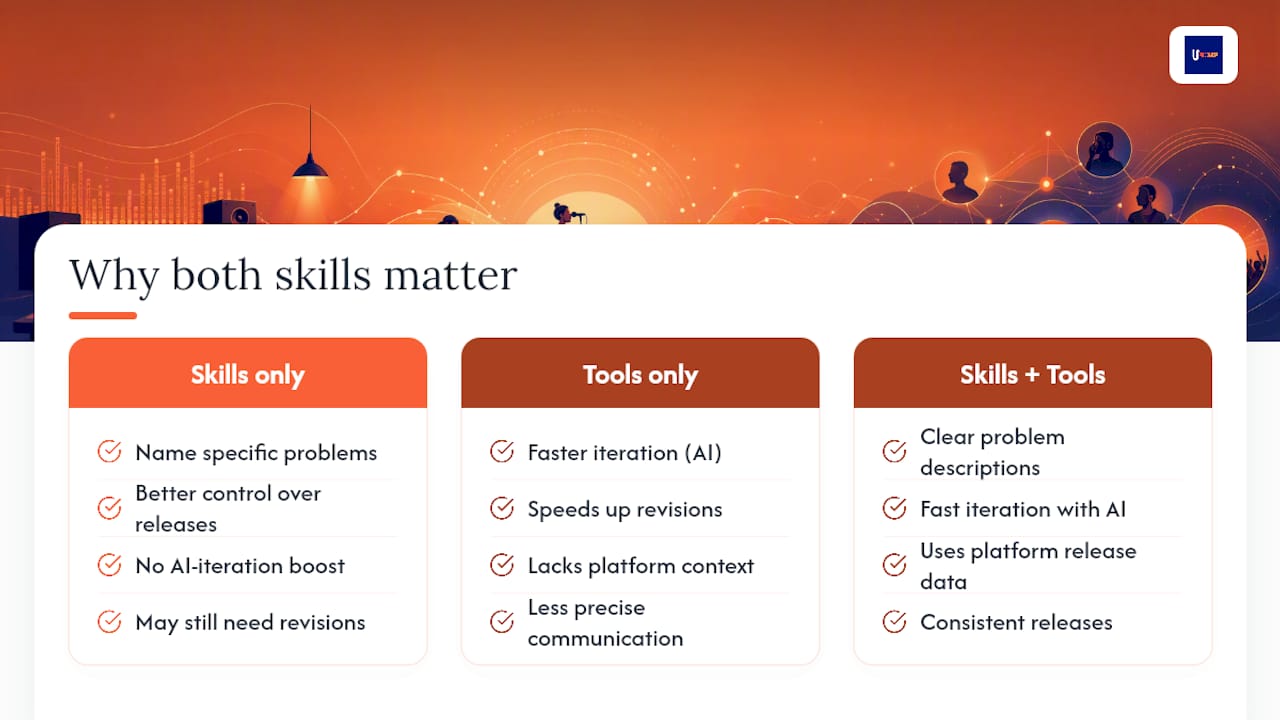
Understanding mixing and mastering separately changes how you talk to engineers and how much control you keep over your own releases. You stop describing problems vaguely (“make it sound bigger”) and start naming what’s actually wrong: a frequency clash, a headroom issue, a sequencing gap.
Pairing that knowledge with the right tools matters just as much as the knowledge itself. AI mastering can speed up your iteration cycle dramatically, but it works best alongside platform data on how your mixes translate once they’re released, not in isolation. That combination, skill plus tooling, is what separates artists who release consistently from artists stuck in revision loops.
— Karan
Get Your Mix Mastered and Distributed Without the Bottleneck
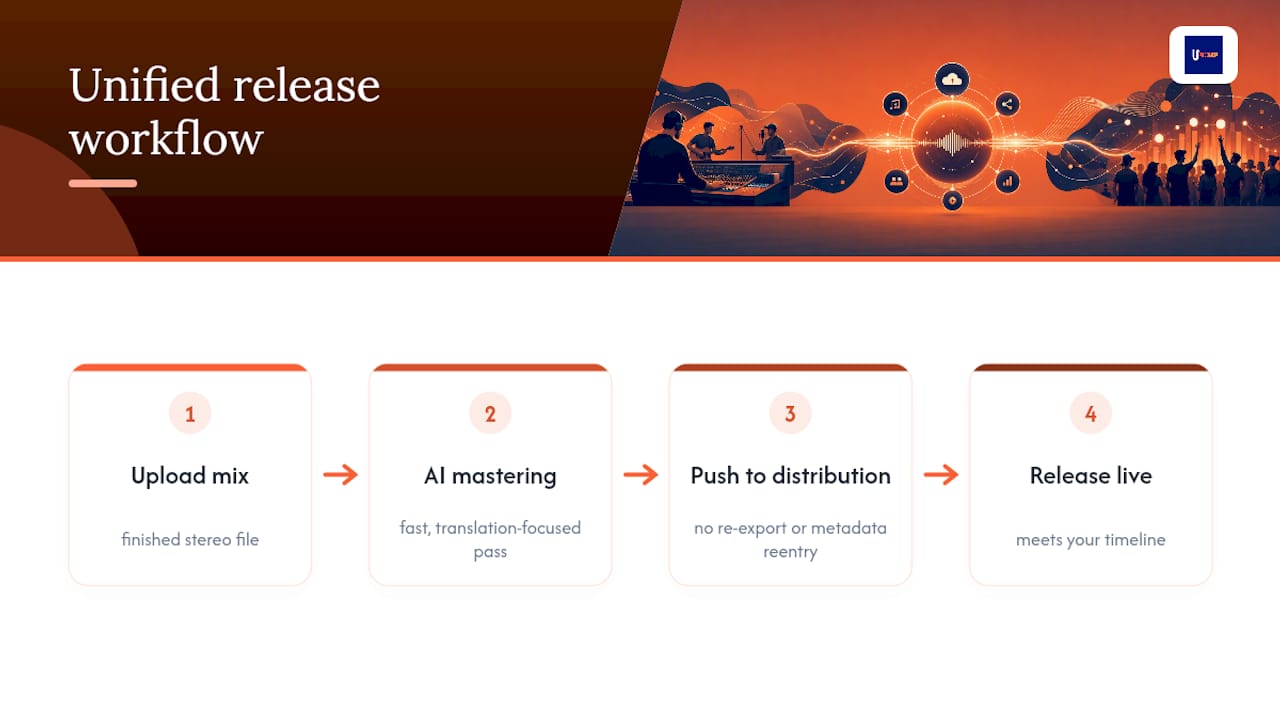
Most independent artists lose momentum in the gap between “mix is done” and “song is live.” UpNComer closes that gap by putting AI mastering, distribution, and release tools in one workflow instead of three separate logins and three separate invoices. You upload your finished mix, run it through UpNComer’s mastering engine for a fast, translation-focused pass, and push straight into distribution without re-exporting files or re-entering metadata for a different platform. No agency retainer, no waiting on a mastering engineer’s calendar when you’re on a release deadline. If you’ve been sitting on a finished mix because the mastering and distribution steps feel like separate projects, that’s the exact friction UpNComer is built to remove. Check your track against your release timeline and get it moving.
Where These Facts Come From
Technical details on mastering deliverables and sequencing come from Wikipedia’s mastering overview. Headroom and mixing fundamentals draw from Sweetwater’s mixing and mastering guide and the Music Production Wiki’s mastering chain.
Sources
- Here’s what mastering will and won’t do for your tracks - Mixing Lessons
- What is the Difference Between Mixing and Mastering? - Sweetwater
- Mastering - Music Production Wiki
- Mixing vs Mastering: How to hear the difference - RouteNote
FAQ
Is Mastering Easier Than Mixing?
No, it’s different work, not easier work. Mastering deals with subtler, fractional adjustments across a whole stereo file, while mixing involves bigger, more numerous decisions across individual tracks.
Should I Mix or Master First?
Always mix first. Mastering refines a finished mix rather than building balance from scratch, so mastering a rough or unbalanced mix just locks in its problems.
What Is the Difference Between Mixing and Mastering?
Mixing balances individual tracks within a song using EQ, compression, and panning; mastering works on the finished stereo mix to optimize loudness, tonal balance, and consistency for distribution.
Can Mastering Fix a Bad Mix?
Not reliably. Mastering can’t access individual instruments inside a stereo file, so it can’t fix a buried vocal, harsh drums, or a bad performance. Fixes like that belong back in the mix session.