AI Audio Mixing for Independent Musicians: 2026 Guide

AI audio mixing is defined as the use of intelligent software to analyze, balance, and optimize individual audio tracks, producing professional-quality mixes faster than traditional manual methods. Tools like MixingGPT, Sonible pure:bundle, and browser-based platforms like Vocuno now give independent musicians access to the kind of mix feedback that once required a seasoned engineer and an expensive studio. The core value is not automation for its own sake. It is getting precise, data-driven feedback on your mix so you can make better creative decisions in less time. If you have ever stared at a session wondering why your low-mids sound muddy or your vocals sit too far back, AI audio mixing gives you a starting point grounded in actual frequency analysis, not guesswork.
How do AI audio mixing tools work inside DAWs?
Pro-level AI mixing runs primarily through in-DAW plugins that analyze your session in real time and deliver specific, actionable feedback. MixingGPT and Sonible pure:bundle both integrate directly into major digital audio workstations including Logic Pro, Ableton Live, and Pro Tools. They do not just hand you a finished file. They act as a critique engine, pointing out what is wrong and why.
Here is what these tools typically do inside your DAW:
-
Frequency analysis: The plugin scans individual stems and flags tonal conflicts, such as competing low-mids between a bass guitar and a kick drum, with specific Hz targets for correction.
-
Dynamics feedback: AI identifies where compression ratios are too aggressive or where transients are being crushed, then recommends gain reduction targets in dB.
-
Genre and instrument profiles: Tools like MixingGPT let you select a genre or instrument profile, so the AI benchmarks your mix against professional references in that style.
-
Balance critiques: The engine compares your stereo field, panning decisions, and level relationships across stems, then flags imbalances with plain-language explanations.
The key distinction is that AI critiques your mix with reasoning, not black-box fixes. You stay in control of every fader and plugin. The AI tells you what to address and where, then you decide how to act on it.
Pro Tip: Before running any AI analysis, commit your gain staging first. AI tools read level relationships between stems, so if your tracks are clipping or sitting at inconsistent levels, the feedback will be skewed from the start.
This workflow removes the most tedious part of mixing: the diagnostic phase. Instead of spending an hour hunting for a frequency clash by ear, the AI surfaces it in seconds. That frees your attention for the decisions that actually define the sound of a record.
What are the different types of AI mixing approaches in 2026?
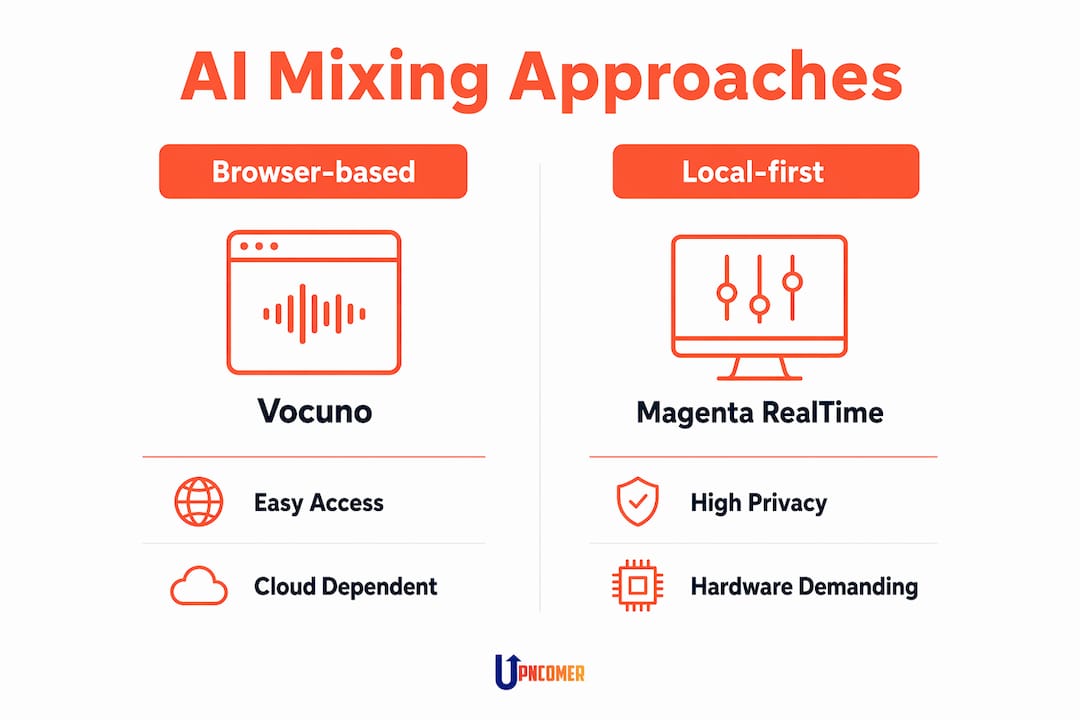
Not every AI mixing tool works the same way. The three main models are browser-based, in-DAW plugin, and local-first offline tools. Each suits a different type of user and project.
| Approach | Example Tools | Best For | Key Trade-offs |
|---|---|---|---|
| Browser-based | UpNComer, Roex, Vocuno, MixMaster AI | Quick feedback, beginners | Limited file length, less depth |
| In-DAW plugin | MixingGPT, Sonible pure:bundle | Engineers wanting session-level control | Subscription cost, DAW dependency |
| Local-first / offline | Magenta RealTime 2, Phantom | Power users, privacy-focused workflows | Requires 7.5–12+ GB GPU VRAM |
| Cloud API | MixMaster AI (API mode) | Developers, batch processing | Latency, ongoing cloud costs |
Browser-based AI mixing
Browser-based tools like Vocuno and Roex let you upload audio files in formats including MP3, WAV, FLAC, and AAC, and receive an automated mix in under 60 seconds. You can type plain-language commands like “boost the vocals” or “reduce the low end” without touching a single plugin. The trade-off is real: most browser tools cap uploads at 4–8 minutes and do not give you stem-level control. They work well for demos, quick client previews, or musicians who are not yet comfortable inside a DAW.
Local-first AI mixing
Local-first tools like Magenta RealTime 2 and Phantom run entirely on your own GPU, with no cloud dependency. That means zero latency from server round-trips and full privacy for your unreleased music. The catch is hardware. These tools require 7.5–12+ GB of GPU VRAM to run in real time, which rules them out for most laptop setups. For producers with a capable workstation, local-first AI mixing is the most responsive and private option available.
Cloud API and hybrid models
MixMaster AI takes a different approach. It handles both mixing and mastering from plain English prompts via web API endpoints, applying vocal chains, beat looping, and mastering chains automatically. This model suits developers building music tools or artists who want a release-ready file without manual intervention. The downside is that batching mix and master together without proper stem preparation often produces muddy results.
How to implement AI mixing effectively in your workflow
AI is an accelerator, not a replacement for engineering skill. LANDR’s research on AI music production confirms that AI performs best when it handles the technical groundwork, setting baseline EQ curves and compression ratios, while the engineer focuses on emotional and artistic decisions. That division of labor is the right mental model.
Here is a practical workflow for getting the most out of AI mixing tools:
-
Prepare your session first. Organize tracks, label stems clearly, and commit your gain staging before running any AI analysis. Garbage in, garbage out applies here more than anywhere.
-
Run AI analysis on individual stems, not the full mix. Stem-level feedback is far more specific. Asking an AI to critique your full stereo bus tells you less than asking it to analyze your vocal chain alone.
-
Treat AI output as a checklist, not a verdict. When MixingGPT flags a 200 Hz buildup in your guitar, verify it with your own ears before cutting. AI identifies patterns; you decide whether they matter for your song.
-
Fix frequency conflicts manually after AI flags them. The iterative process works like this: AI identifies the issue, you apply the fix, then re-analyze. Do not expect one pass to solve everything.
-
Do not confuse mixing with mastering. Mixing and mastering are distinct processes. AI mixing tools work on per-stem gain staging and compression. Mastering AI applies serial chains to your final stereo file. Running a mastering tool on an unfinished mix will not save a bad balance.
Pro Tip: If you are choosing between tools, match the tool to your hardware and project type. Browser tools for quick demos, in-DAW plugins for session work, and local-first tools only if your GPU can handle the VRAM requirements.
The most common mistake independent musicians make is over-automating. They let the AI produce a finished file and call it done. The artists who get the best results use AI to surface problems, then apply their own judgment to solve them.
What are advanced AI mixing workflows for power users?
Experienced engineers are pushing AI mixing well beyond plugin feedback. The most advanced setups use MCP (Model Context Protocol) servers to give AI agents like Claude Code direct control over a DAW session in REAPER. This is not a plugin. It is a protocol that lets an AI agent read and write to your session, managing track routing, FX chains, and automation lanes in real time.
Key capabilities in advanced AI mixing workflows include:
-
Real-time metering: AI reads peak levels, RMS values, and LUFS targets across all tracks simultaneously, flagging issues faster than any human could scan a meter bridge.
-
FX chain management: The AI can insert, reorder, or bypass plugins on specific tracks based on mix analysis, without you touching the session manually.
-
Automation manipulation: AI writes volume and pan automation based on detected dynamic inconsistencies, then flags the changes for your review.
-
Critique in Hz and dB: Rather than vague suggestions, Phantom and Claude Code deliver feedback like “reduce 3.2 kHz by 2.5 dB on the snare overhead” based on professional mixing rules and plugin knowledge.
“AI’s greatest value is as an assistant that gives the DAW ‘ears,’ analyzing against genre references and pointing out specific mix deviations for human correction.” — Phantom AI Audio Engineering System
Hardware is the real barrier for this tier of workflow. Local AI mixing tools require 7.5–12+ GB VRAM for real-time performance. A mid-range gaming GPU will not cut it for live session analysis. If your rig cannot meet that threshold, cloud-based critique tools like MixingGPT deliver most of the analytical value without the hardware cost.
The deeper insight here is that integrating AI as a playable instrument inside the DAW removes the disruptive export and import cycles that slow creative momentum. When the AI lives inside your session, the feedback loop is immediate.
Key takeaways
AI audio mixing delivers the most value when engineers use it as a diagnostic and feedback tool, not a one-click solution, preserving creative control while cutting technical groundwork time.
| Point | Details |
|---|---|
| AI mixing is a critique engine | Tools like MixingGPT flag specific frequency and dynamic issues rather than producing a finished mix. |
| Match tool type to your setup | Browser tools suit quick demos; in-DAW plugins suit session work; local-first tools require 7.5–12+ GB GPU VRAM. |
| Mixing and mastering are separate | Apply AI mixing tools to stems first, then use mastering AI on your final stereo file only. |
| Iterate, do not automate blindly | Run AI analysis, apply manual fixes, then re-analyze. One pass rarely resolves all issues. |
| Hardware gates advanced workflows | MCP-based DAW control with Phantom or Claude Code requires substantial GPU resources to run in real time. |
Why I think most musicians are using AI mixing backwards
Here is the honest truth: most independent artists treat AI mixing like a magic button. They upload a rough mix, download the processed file, and wonder why it still sounds amateur. The tool is not the problem. The approach is.
The producers I have seen get real results from AI mixing use it the way a good engineer uses a reference track. They run the analysis, read the critique, then go back into their session and fix things themselves. The AI tells them the kick and bass are fighting at 80 Hz. They pull up their EQ and carve it out. That is the workflow. The AI is the second set of ears, not the hands.
What excites me most about where this is heading is the DAW integration angle. When tools like Phantom and Magenta RealTime 2 mature to the point where AI lives natively inside your session, the creative flow changes completely. You stop thinking about mixing as a separate phase and start thinking about it as part of the writing process. That is a genuinely different way to make music.
Another suggestion on this front would be Roex and their product Automix. RoEx Automix is an AI multitrack mixing and mastering platform built from research at Queen Mary University of London’s Centre for Digital Music. Unlike tools that only polish a finished stereo file, Automix works from your individual stems, so mix decisions and mastering happen together rather than as separate steps.
-
AI multitrack mixing and mastering from raw stems, not just a final bounce
-
Reference track matching for mastering, so your release can target the tone of a track you already love
-
Exports to Ableton Live, Bitwig Studio, and Fender Studio
-
Available as a web app and desktop app
If you are just starting with AI mixing, pick one tool and learn it deeply before adding another. MixingGPT inside your DAW is a solid starting point. Read the AI mastering guide when you are ready to understand how mixing and mastering connect. Build the knowledge first. The tools will keep improving, but your ears and judgment are what make the difference.
— Karan
Take your music further with Upncomer

Upncomer is built for independent musicians who want to grow their careers without handing control to a label or juggling ten different platforms. The platform brings together AI-powered tools, streaming analytics, fan engagement, release planning, and music marketing inside one place. If you are serious about using AI music production tools to build a real career, Upncomer gives you the infrastructure to do it. From Amplitude AI guidance to distribution and campaign management, everything you need is in one ecosystem. Join Upncomer and start building the kind of career that runs on data, creativity, and your own terms.
FAQ
What is AI audio mixing?
AI audio mixing is the use of machine learning software to analyze audio tracks and provide mix feedback, including frequency corrections, dynamics adjustments, and balance recommendations. Tools like MixingGPT and Sonible pure:bundle deliver this feedback inside your DAW without replacing manual engineering.
Do I need expensive hardware for AI mixing?
Browser-based tools like Vocuno require no special hardware and run in any web browser. Local-first tools like Magenta RealTime 2 and Phantom require a GPU with 7.5–12+ GB VRAM for real-time performance.
Can AI mixing replace a professional audio engineer?
AI mixing accelerates technical tasks like EQ and compression setup, but human judgment remains essential for preserving artistic intent and emotional impact. AI is a diagnostic tool, not a substitute for engineering experience.
What is the difference between AI mixing and AI mastering?
AI mixing tools process individual stems for gain staging, EQ, and compression. AI mastering tools apply serial processing chains to a finished stereo file. Running a mastering tool on an unmixed session will not fix a poor balance.
Which AI mixing tool is best for beginners?
Browser-based tools like Vocuno are the most accessible starting point. They accept common audio formats including MP3, WAV, and FLAC, and return a processed mix in under 60 seconds with no DAW required.