Make an Artist One Sheet for Indie Artists in 45 Minutes (Template)
An artist one-sheet is a one-page, skim-first marketing document built to get you the first look from bookers, press, and playlist curators. It compresses your bio, stats, and links into something a stranger can scan in under a minute. Use it as an email attachment or a leave-behind at shows, not as a replacement for your full electronic press kit.
TL;DR:
- Keep your one-sheet focused on momentum highlights, such as recent streams, notable gigs, or festival shortlists, rather than raw follower counts.
- Use a simple, clean layout with one strong photo, a brief bio, and key stats, updating it with each new release or milestone.
- Customize the version for different audiences, emphasizing live history for bookers or genre and mood for curators and licensing contacts.
- Ensure your streaming and contact links are easily accessible, with high-resolution images and clear attribution rights for photos and graphics.
- Use a hosting platform or short URL for easy updates, and revisit your one-sheet every few months to keep it current and relevant.
Table of Contents
- What Is an Artist One-Sheet, and How Is It Different From an EPK?
- The One-Sheet Checklist: Every Field You Need, Filled In
- How to Create a One-Sheet Fast (With Copy-Paste Snippets)
- Photo and File Specs: What Actually Meets Platform Standards
- Who Reads Your One-Sheet, and What Changes Based on Who It Is
- Two Examples of a Finished One-Sheet, Plus a Template
- How to Format Your Contact and Booking Info
- The Mistakes That Make a One-Sheet Look Amateur
- Image Rights and Copyright: What to Get Right Before You Send Anything
- A Practical Take on Keeping Your One-Sheet Lean
- Build, Host, and Update Your One-Sheet Without Starting From Scratch Every Time
- Sources
- FAQ
What Is an Artist One-Sheet, and How Is It Different From an EPK?
A one-sheet is a compressed, single-page version of an electronic press kit (EPK), built to be skimmed fast and dropped into an email or handed off in person. The EPK is the deeper, hosted package someone opens once they’re already interested.
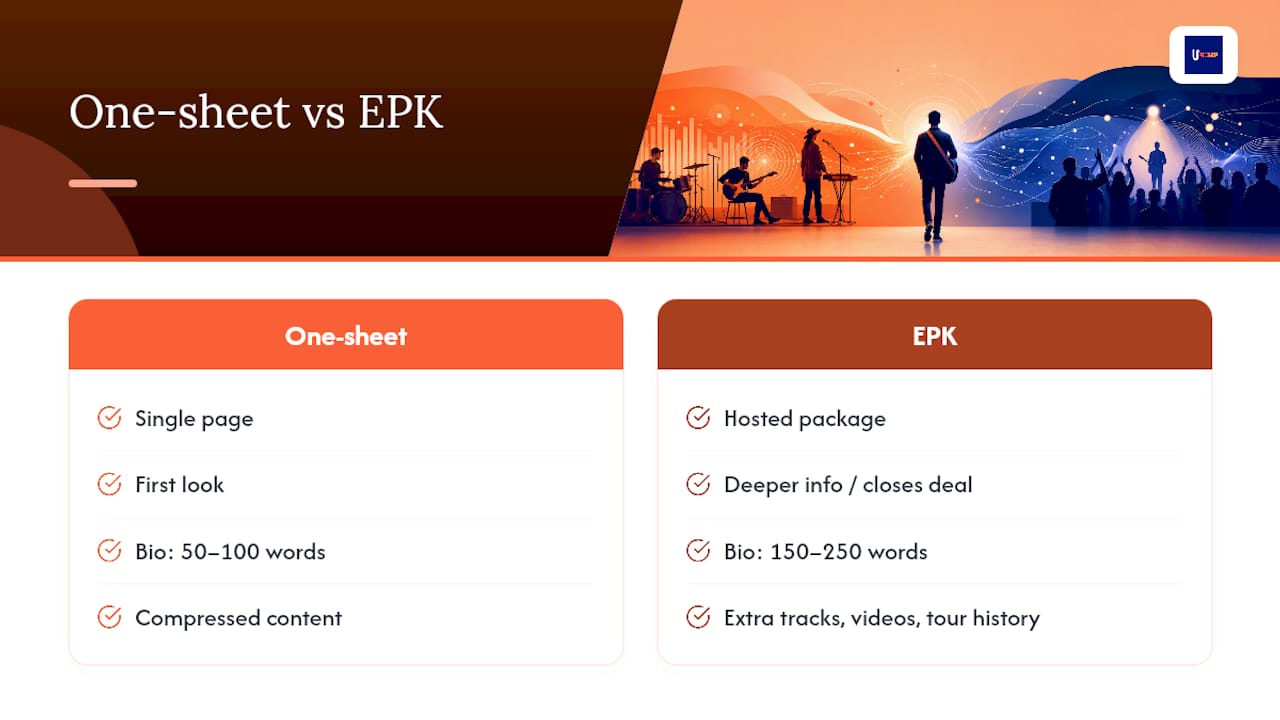
That split matters because the two documents do different jobs. Your one-sheet gets the first look. Your EPK closes the deal once a booker or blogger wants more: extra tracks, videos, a longer bio, tour history.
This is also why smart artists keep two versions of their bio: a tight one for the one-sheet and a longer one for the EPK. The Musicians Institute recommends a short bio of 50 to 100 words and a long bio of 150 to 250 words. Send the one-sheet when you’re introducing yourself cold. Send the EPK after someone replies asking for more.
The One-Sheet Checklist: Every Field You Need, Filled In
Think of your one-sheet as a form you fill out once and update forever. Every field earns its spot, or it gets cut. Here’s what actually belongs on it, based on what ICMP London recommends artists include:
- Short third-person bio (3 to 4 sentences). Write it like a journalist would describe you, not like you’re pitching yourself. Keep it punchy, not a life story.
- Top achievements with context. Streaming totals, follower counts, notable gigs, or press mentions all work, but numbers alone don’t sell you.
- One high-resolution photo. A single strong image beats a photo dump. Save the gallery for your EPK.
- One release highlight. Your latest single or the track getting the most traction right now, with a streaming link attached.
- RIYL (Recommended If You Like). Two or three comparable artists paired with a one-line genre tag.
- Contact and booking info. A direct email or booking contact, not a generic “DM us” line.
- Optional: a press quote or technical rider. Only if you have something real to show.
If your streaming numbers are modest, don’t leave the stats section blank or, worse, inflate it. Lean on what ICMP calls “ascent” milestones instead: an opening slot for a bigger act, a festival shortlist, a positive local review. Bookers recognize momentum even when the raw numbers are small.
For that RIYL line, resist the urge to list five reference artists. Two or three comparisons with a tight genre tag work as instant shorthand for a curator deciding whether to click play.
How to Create a One-Sheet Fast (With Copy-Paste Snippets)
You don’t need design software or a graphic designer for this. You need forty-five minutes and a clear head. Here’s the sequence:
- Define the purpose. Are you pitching a booker, a blog, or a playlist curator? The version you send should lead with whatever that recipient cares about most.
- Draft your short bio. Use the fill-in template below and edit until it sounds like you, not a press release.
- Pull your top three stats. Pick the ones that tell a story of momentum, not just raw size.
- Add your release highlight and streaming links. Link out rather than embedding audio files. It keeps the document light and shareable.
- Drop in your photo, RIYL, and contact info. One photo, two or three RIYL names, one direct contact line.
- Export as a PDF, or host it as a page with a short URL. Bandzoogle’s one-sheet templates are built exactly for this kind of fast turnaround.
Here are three fill-in-the-blank snippets to speed up the draft:
- Bio opener: “[Artist name] is a [genre] artist from [city] known for [one distinctive trait, e.g., ‘genre-blurring production’ or ‘raw, live-first energy’].”
- Achievement line: “Since releasing [song/EP name], [artist name] has earned [stat, e.g., streams, followers] and played [notable show or support slot].”
- Pitch sentence: “[Artist name]'s new single ‘[track name]’ blends [reference artist] and [reference artist] for fans of [genre/scene].”
Pro Tip: Build your one-sheet as a page on your own site with a short, memorable URL instead of a static PDF only. It’s easier to update, easier to share on Instagram or in a DM, and you’re not stuck resending a new attachment every time a stat changes.
Before you send anything, run this final check: bio reads clean in one skim, links open on mobile, photo isn’t blurry at small size, and your contact info is current.
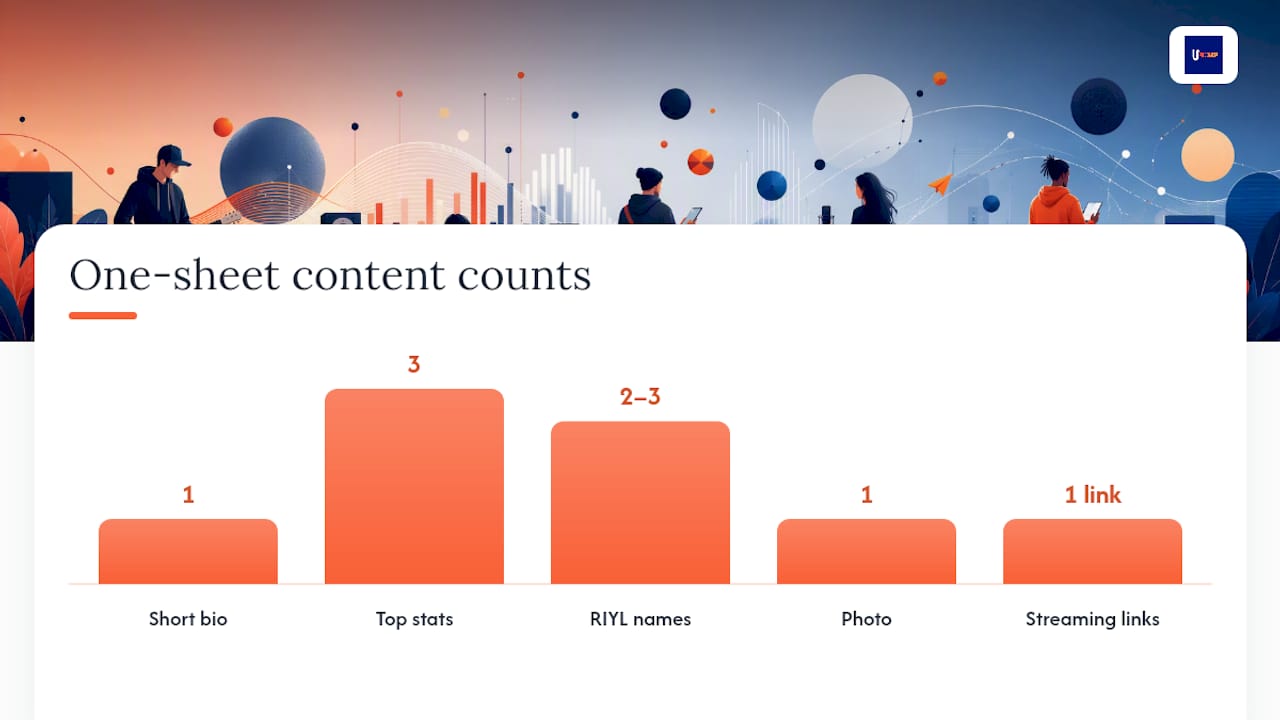
Photo and File Specs: What Actually Meets Platform Standards
Getting your image specs wrong is a small mistake that makes you look unprepared. Here’s what to match, whether the one-sheet is going out as a web link or a printed handout.
These benchmarks come from Velveteen’s guide to artist one-sheets and EPKs, which draws on current Spotify and Apple Music artwork guidance. Keep two versions of your key photo on hand: a 72 DPI file for web and email, and a 300 DPI file for anyone who might print it. Include a transparent PNG of your logo too, in case a venue or promoter wants it for a flyer.
Link to your streaming platforms rather than embedding audio or attaching downloadable files. One-click playback converts better than forcing someone to download an MP3, and it keeps your PDF file size manageable enough to actually land in an inbox.
Who Reads Your One-Sheet, and What Changes Based on Who It Is
The version you send a talent buyer shouldn’t be identical to the version you send a music blog. Each recipient scans for something different:
- Bookers want live history, draw numbers, and a technical rider up front. Streaming stats matter less than proof you can fill a room.
- Press and bloggers care about your story angle and release highlight, especially anything timely they can hook a piece to.
- Playlist curators want RIYL and genre clarity fast. They’re deciding in seconds whether your sound fits their audience.
- Sync and licensing contacts want mood, genre, and instrumentation cues, not tour dates.
Cut whatever doesn’t serve the reader in front of you. A booker doesn’t need your Spotify monthly listener count highlighted; a curator doesn’t need your rider.
On cadence: treat your one-sheet like a living document, not a one-time PDF. Revisit it every time you release new music, and follow up with press or bookers roughly two to three weeks after your first send if you haven’t heard back.
Two Examples of a Finished One-Sheet, Plus a Template
Example A: single-release one-sheet. The release highlight takes top billing, with the streaming link front and center under the artist photo. Bio stays to three sentences. Stats section leads with the most recent momentum: a playlist add, a premiere, or a strong first-week stream count.
Example B: booking-focused one-sheet. Live history takes the lead spot instead of the new release. Past venue names, notable support slots, and a link to a technical rider sit above the fold. The bio shifts to emphasize live energy over recorded sound.
A solid template should already include placeholders for:
- Short bio field
- Achievement/stat line
- RIYL field
- One to two photo slots
- Release highlight with streaming link
- Contact and booking info block
Start from a template like this rather than a blank page. Filling in placeholders is faster than deciding on layout from scratch, and it keeps you from forgetting a field under deadline pressure.
How to Format Your Contact and Booking Info
This section gets rushed more than any other, and it’s the one that actually closes deals. A vague “reach out anytime” line at the bottom of your one-sheet does nothing for a booker trying to move fast.
List a direct contact name if you have management or a booking agent, and a role label if you don’t (“Booking: [email]” works fine if it’s just you). Include one email address, not three. If you have a booking-specific inbox separate from your fan-facing one, use that one here. Add a phone number only if you’re comfortable being reached that way, since bookers sometimes do call.
Skip generic social media handles as your primary contact method. A DM is easy to miss, and it signals you’re not set up to be booked professionally. If you want to include socials, put them below the primary contact line as a secondary reference point, not the main ask.
For artists working with a manager or agent, list that person’s name and title clearly: “Management: [Name], [email]” or “Booking Agent: [Name], [agency], [email].” This tells the recipient exactly who makes decisions and who to follow up with, which speeds up every conversation that follows.
One more detail that’s easy to overlook: date your one-sheet, or at least keep a version note somewhere in your files. A one-sheet with stale contact info is worse than no one-sheet at all, because it wastes a booker’s time and makes you look disorganized before they’ve even heard a song.
The Mistakes That Make a One-Sheet Look Amateur
Most one-sheet failures aren’t about bad music. They’re about basic execution.
Overloading the page. Cramming five photos, a full discography, and a paragraph-long bio onto one page defeats the purpose. A one-sheet is meant to be skimmed in under a minute, not studied.
Burying the release link. If someone has to hunt for how to actually hear your music, you’ve lost them. Put your streaming link near the top, next to the release highlight, not buried in a footer.
Embedding audio instead of linking to it. Attached MP3 files bloat your file size and often get stripped by email clients. Link to Spotify or Apple Music instead.
Using a low-resolution or outdated photo. A blurry press photo, or one from three years ago that doesn’t look like you now, undercuts your credibility before anyone reads a word.
Listing stats with no context. “10,000 monthly listeners” means nothing on its own. Pair numbers with a timeframe or milestone so they read as momentum, not just a raw figure.
Forgetting to update it. A one-sheet that still lists a single from two releases ago tells the reader you’re not actively working. Treat every new release as a trigger to refresh the document.
Writing the bio in first person. One-sheets read as press material. First-person “I” language breaks that frame and reads as less credible to press and bookers.
Skipping RIYL entirely. Without a genre shorthand, a curator has to guess your sound from context alone, and most won’t bother.
Image Rights and Copyright: What to Get Right Before You Send Anything
Every photo on your one-sheet needs a clear answer to one question: who actually owns it? If a photographer shot your press photo, you typically need their explicit permission to use it for promotional distribution, even if they handed you the files. Get that permission in writing, even a short email confirming usage rights, before the image goes out to press or bookers.
Add a photo credit line near the image itself: “Photo: [Photographer Name].” It’s a small courtesy that protects you from disputes and is often a contractual requirement if you didn’t buy full rights outright. If you commissioned the photos and paid for full buyout rights, you can skip the credit, but confirm that in writing with the photographer beforehand rather than assuming.
For your logo, artwork, or any graphic elements on the one-sheet, make sure you have rights to use them commercially. A font or graphic pulled from a free asset site may carry usage restrictions you haven’t checked. Read the license before you build your layout around it.
If your one-sheet includes a press quote, keep the attribution accurate: name the publication and, where possible, the writer. Misattributing or fabricating a quote is a fast way to damage your credibility with the exact gatekeepers you’re trying to win over.
None of this needs a lawyer for a basic one-sheet. It just needs you to ask “do I actually have the right to use this?” before you hit send, not after someone asks.
A Practical Take on Keeping Your One-Sheet Lean
The biggest mistake independent artists make isn’t a missing field. It’s treating the one-sheet like a monument instead of a working document. Bookers and editors scan for seconds, not minutes, so clarity beats completeness every time.
Update it every time you release music or hit a real milestone. If you’re running a 12-week rollout, your one-sheet should get a refresh at the start of that cycle, not an afterthought at the end.
— Karan
Build, Host, and Update Your One-Sheet Without Starting From Scratch Every Time
Keeping a one-sheet current gets harder the more releases you put out, and that’s exactly the problem UpNComer’s Artist Manager module solves. Instead of hunting down your latest stats across five different apps every time you need to update a PDF, UpNComer centralizes your streaming analytics, release history, and audience data in one place.

Your Growth Engine and Data Analyst modules pull the real numbers automatically, so your “top achievements” section reflects what’s actually happening with your streams and audience, not last quarter’s guess. Pair that with Distribution handling your release links, and you’ve got a one-sheet that stays accurate without a manual audit every few weeks.
If you’re managing your own rollout and want your promotional materials to keep pace with your release calendar, some distribution tools tie release links, streaming data, and campaign tracking together in one system, so your one-sheet can update itself instead of falling out of date the moment you drop a new single.
Sources
- What to Include on a One-Sheet as a Music Artist | ICMP London
- How to Build Your First EPK | Musicians Institute
- What Is an Artist One-Sheet / EPK | Velveteen
- Create a Beautiful Music Onesheet with Templates | Bandzoogle
FAQ
What Is a One-Sheet for a Music Artist?
A one-sheet is a single-page, skim-first promotional document that gives bookers, press, and curators a fast introduction to an artist, including a short bio, top stats, a release highlight, and contact info. It’s meant to be sent as an email attachment or handed out as a leave-behind, not read like a full press kit.
How Do You Make an Artist One-Sheet?
Start by defining who you’re sending it to, draft a 3 to 4 sentence third-person bio, pull your top three momentum stats, add a release highlight with a streaming link, and include one high-resolution photo plus your RIYL and contact info. Export it as a PDF or host it as a page with a short URL, following proven one-sheet templates to keep the layout clean.
What’s the Difference Between a One-Sheet and an EPK?
A one-sheet is the compressed, single-page version built to be skimmed quickly, while an EPK is a deeper, hosted package with a longer bio, multiple photos, and several tracks or videos. Send the one-sheet first to get attention, and follow up with the EPK once someone shows real interest.
How Long Should the Bio on a One-Sheet Be?
Keep the one-sheet bio to just 3 to 4 sentences of short, punchy copy, reserving a longer 150 to 250 word version for your full EPK. Anything longer defeats the purpose of a document meant to be read in under a minute.
How Often Should You Update Your One-Sheet?
Update your one-sheet every time you release new music or hit a real milestone, and review it on at least a three-month cadence even without major news. Stale contact info or an outdated release highlight signals to bookers and press that you’re not actively working.